

A video ad storyboard is a panel-by-panel visual plan that maps every shot, line of dialogue, and timing cue before a camera rolls. Its job is simple: get everyone (client, director of photography, editor) agreeing on the same 30 seconds before you spend money shooting it. A board built right saves reshoots, protects legal approvals, and turns a vague brief into something a crew can actually execute.
TL;DR:
- A production-level storyboard is essential for campaigns with a budget, multiple formats, legal review, or complex timing effects; simpler ads often suffice with a shot list and script.
- Each storyboard panel must include specific details such as shot size, duration, dialogue, legal notes, and VFX, to ensure smooth execution and minimize costly reworks.
- Locking core beats like the hook, reveal, and CTA before detailed storyboarding, and aligning with the director of photography reduces the need for revision and avoids expensive mistakes.
- Timing the first three seconds carefully and designing for platform aspect ratios ensure key messages and legal disclosures are clear and effective across formats.
- Automated variant generation works best when core concepts are fixed, but initial storyboarding should be human-led to establish an effective foundation for fast and accurate production.
Table of Contents
- What Is a Video Ad Storyboard, and When Do You Need One?
- The Essential Fields Every Storyboard Panel Needs
- How to Build a Storyboard From Brief to Production-Ready Board
- How Should You Time a Storyboard for Hooks and Platforms?
- Storyboard Templates for :15, :30, :60, and Vertical Ads
- What Editors and AI Tools Need in a Production Handoff
- Pre-Shoot Checklist and the Mistakes That Cause Reshoots
- When Automation Beats a Hand-Drawn Board, and When It Doesn't
- Scale Your Ad Variants Without the Agency Wait Times
- Sources
What Is a Video Ad Storyboard, and When Do You Need One?
Commercial storyboards differ from film storyboards in one key way: audience. A film storyboard mostly serves the director and crew. A commercial storyboard has to satisfy a client who's approving spend, a legal team checking claims, and a production crew who needs exact shot instructions. That dual audience is why ad storyboards tend to carry more annotation than their narrative-film cousins, even for a 15-second spot.
Not every ad needs a full storyboard. A quick UGC-style TikTok ad shot on a phone might only need a shot list and a rough script. But a full production-level board earns its keep when the stakes go up: national campaign budgets, multi-format deliverables (a single :30 spot that has to become a :15, a 9:16 cutdown, and a silent autoplay version), or anything touching regulated claims like health, finance, or alcohol.
Use a production-level storyboard when:
- The budget involves a paid crew, rented location, or talent fees
- The ad will run across multiple platforms with different aspect ratios
- Legal or compliance review is required before shooting
- More than three stakeholders need to sign off before production
- The concept relies on timing gags, reveals, or effects that are hard to describe in words alone
For everything else, a script and a shot list usually get you there faster.
The Essential Fields Every Storyboard Panel Needs
A storyboard panel that only shows a picture is half a tool. Editors and directors of photography need enough written detail to execute the shot without a follow-up call. StudioBinder's guide to commercial storyboards frames this well: the board exists to turn an abstract idea into something a crew can approve and build against, which only works if the annotation is specific.
Every panel should carry these fields:
- Visual/frame sketch: even a rough drawing beats a blank box
- Shot size and camera angle: close-up, medium, wide; eye-level or low-angle
- Duration and timestamp: exactly where this frame sits in the runtime
- VO or on-screen dialogue: the precise line, not a paraphrase
- On-screen text/supers: what appears, and when it fades in or out
- Music or SFX cue: a beat drop, a whoosh, silence for emphasis
- Legal or branding notes: disclaimers, logo lockups, required copy
- Continuity notes: wardrobe, props, lighting or time-of-day consistency
- VFX callouts: anything requiring post-production work, flagged early
Skipping the continuity and legal fields is where most boards fall apart during the shoot, not during the pitch.
Pro Tip: Add a caption timing column even if you're not required to caption yet. W3C's guidance on captions recommends planning caption placement early, and doing it at the storyboard stage means your editor isn't guessing where text should sit weeks later.
How to Build a Storyboard From Brief to Production-Ready Board
A storyboard drawn before the script is locked is a storyboard you'll redraw. The order matters more than the drawing skill.
-
Write the brief first. One page, max. State the objective, the audience, the platform, and the single message the ad needs to land.
-
Time the script against the runtime. Read it aloud with a stopwatch. A script that reads fine on paper often runs long once you factor in pauses and visual beats. Adjust before you draw a single frame.
-
Lock the key beats before boarding anything. Identify the hook, the product reveal, and the brand moment. These three beats are non-negotiable; everything else is connective tissue.
-
Board the core frames first. Draw the hook, the reveal, and the CTA before you touch the transitional shots. Commercial storyboard workflows consistently recommend locking the story's anchor beats before filling in the connecting shots, specifically to avoid redraws once the concept shifts.
-
Fill in connective shots. Now add the transitions, cutaways, and B-roll that carry the viewer from one beat to the next.
-
Route the board to your director of photography and production team. This is the step most commonly skipped, and it's usually the one that causes the most expensive mistakes. A DP can flag an unshootable angle or an impossible location swap before you've booked anything.
-
Revise based on feasibility feedback, then lock. One clean revision round beats three chaotic ones on set.
This sequence isn't just tidier. Storyboarding from an approved script and locking beats first genuinely reduces the number of revision rounds compared to boarding a script that's still moving.
How Should You Time a Storyboard for Hooks and Platforms?
The first three seconds of a video ad decide whether anyone sees second four. A storyboard has to treat that opening beat as its own design problem, not just the first panel in a sequence.
A reliable structure for a :30 spot breaks into four beats: hook from 0 to 3 seconds, problem or context from 4 to 10 seconds, solution or proof from 11 to 22 seconds, and the call to action from 23 to 30 seconds. Shorter formats compress this ratio rather than dropping beats entirely. A :15 spot might give the hook one second and cram problem and solution into a single combined beat, but the CTA still needs its own dedicated seconds at the end.
Aspect ratio is where boards fall apart during adaptation. A 16:9 frame shot for YouTube doesn't translate cleanly to 9:16 for Reels or TikTok unless you plan for it upfront:
- Keep the subject centered, not framed for widescreen negative space
- Mark a "safe zone" on each panel for where the logo and CTA button will sit, since platform UI elements often cover the bottom third
- Note which shots need a true vertical reshoot versus which can be cropped
Legal copy eats real estate too. Required disclaimers and mandatory disclosures generally need to occupy the final seconds of the spot, timed and visible long enough to actually be read, not just flashed. The FTC's updated advertising guidance makes clear that disclosures need to be planned into the creative, not bolted on after the edit is locked. Put that disclaimer panel on the board from the first draft.
Storyboard Templates for :15, :30, :60, and Vertical Ads
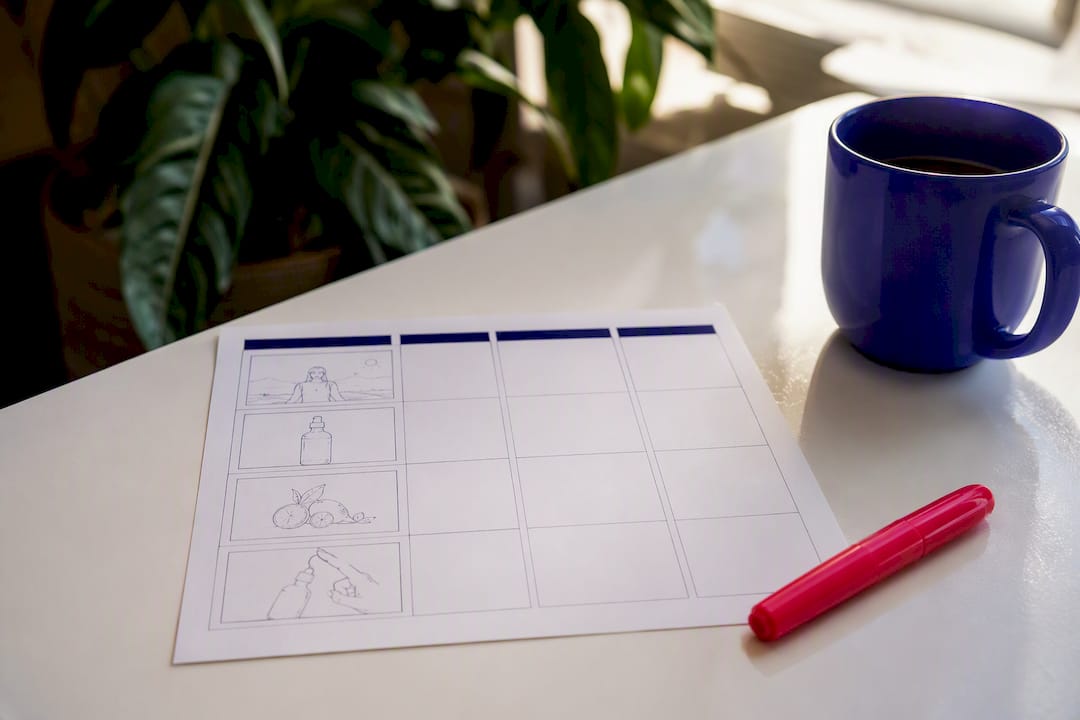
A working template needs four columns, and resist the urge to add a fifth just because it looks more thorough: frame/visual, timestamp, VO and supers, and production notes. That fourth column is where camera specs, prop notes, and legal flags live so nothing gets lost between the board and the shoot.
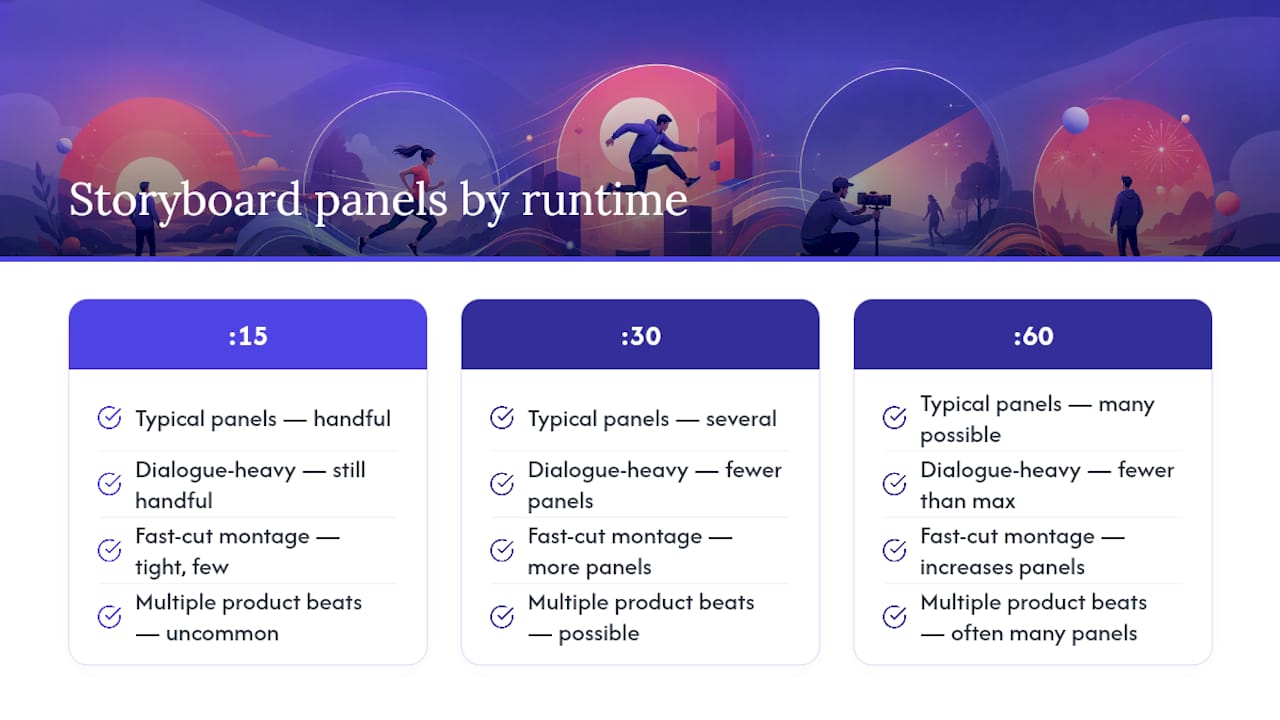
Frame count scales with runtime, but not in a straight line. Practical templates for commercial spots show that a :30 spot typically needs several storyboard panels, with fewer for dialogue-heavy scenes and more for fast-cut montages. A :15 spot usually runs a handful of panels since there's no room for connective shots. A :60 spot can have many panels if it's carrying multiple product beats.
For a compact reels-specific version, drop the wide production-notes column and replace it with a single "hook variant" note, since vertical social ads often get tested with three or four different opening lines against the same visual sequence.
Once the grid is built, it doubles as a prompt. Paste each row into an editor's cut sheet or feed the VO and timing columns to an AI voice or edit tool as structured input, and the panel-by-panel format prevents ambiguity that would otherwise require a follow-up round of clarifying questions.
What Editors and AI Tools Need in a Production Handoff
The handoff is where a beautiful storyboard either earns its keep or gets ignored. Editors and AI-assisted edit tools need exact information, not creative suggestions.
A handoff package should include:
- Camera specs: lens, frame rate, resolution per shot
- B-roll references: links or stills showing the intended look
- Exact VO script, word for word, timed to each frame
- A timing row for every cut, not just major beats
- Music and SFX cues with in and out points
Getting sign-off from your director of photography and production team before handoff matters here too. Skipping that department review is one of the more common causes of reshoots, since a DP will catch a lighting or location problem an editor can't fix after the fact.
Pro Tip: When prompting an AI edit tool, feed it the storyboard's timing and VO columns as structured text rather than a paragraph description. Specificity in, specificity out. A managed video VA team typically returns multiple hook variants from a single approved board within a day or two, which is where fast-turnaround editing earns its value over a slower agency cycle.
Pre-Shoot Checklist and the Mistakes That Cause Reshoots
Run through this before anyone touches a camera:
- Script is timed against the final runtime, read aloud with a stopwatch
- Hook, reveal, and CTA beats are locked and unlikely to change
- Director of photography and production have signed off on feasibility
- Location and lighting conditions match what the storyboard assumes
- Product and brand visibility are confirmed in the frames that need them
The mistakes that cause the most rework are predictable. Storyboarding before the script is locked forces redraws once dialogue shifts. Under-annotating panels (a sketch with no timing, no VO, no legal note) pushes decisions onto the set where they're expensive to make. Ignoring aspect-ratio reframing until editing starts means someone's cropping a face out of frame at 11 p.m. And skipping department routing, as covered above, remains the single most avoidable cause of a reshoot.
Pro Tip: Print the checklist and physically initial each line with the DP present. A verbal "looks good" gets forgotten; a signature doesn't.
When Automation Beats a Hand-Drawn Board, and When It Doesn't
Rapid, automated variant production earns its place when you're fighting ad fatigue or running structured A/B tests. If the core concept and legal copy are already locked, generating five hook variants from one approved board is a volume game, not a creative one, and that's exactly where speed matters more than craftsmanship.
Human-directed storyboarding still wins for brand launches, anything touching regulated claims, or a concept that hinges on a single well-timed visual reveal. Automation can iterate fast once the foundation is right; it can't replace the judgment that builds that foundation in the first place. The mistake isn't choosing automation. It's reaching for it before the core beats are locked, which just means you're now iterating on a flawed concept at higher volume.
— James
Scale Your Ad Variants Without the Agency Wait Times
If your storyboard is locked and you need five ad variants by Friday instead of five weeks from now, that's the exact gap Jamesyee's managed video VA service closes.
Pair that creative speed with clean measurement using a tool like TrackAff's server-side tracking so the performance data behind each new variant actually reflects reality, not a broken pixel. If ad fatigue is quietly draining your campaigns right now, see how the TikTok ad fatigue framework turns one raw video into a week of fresh hooks, and check what a managed VA team could produce from your next approved storyboard.
Sources
For deeper reference, StudioBinder's commercial storyboard guide covers technique in depth, while StoryBirdie's downloadable template gives ready-to-use grids for :15, :30, and :60 formats. Review the FTC's advertising guidance before finalizing disclosure copy, and check W3C's captioning standards for accessibility timing.
- Commercial Storyboard Examples and Techniques
- How To Plan Storyboards For Ad Shoots: A Practical Guide (2026)
- Federal Trade Commission advertising guides update