

A UGC ad script that converts follows one shape: Hook (0 to 3 seconds), Problem, Demo or Proof, Result, then a direct Call to Action. Keep it to 15 to 30 seconds for TikTok and Reels, open with a line that stops the scroll before anyone reads your brand name, and you have a testable draft. That structure is the whole game. Everything below just shows you how to fill it in.
TL;DR:
- Most successful UGC ad scripts follow a five-part structure: hook, problem, proof, result, and call to action, with immediate impact in the first three seconds.
- Using specific, believable proof and measurable results enhances the script’s effectiveness, especially when scripts are tested in multiple variations.
- Testing multiple hooks from different emotional categories on various creators helps identify the most effective way to stop scrolls and improve engagement.
- Authenticity stems from natural speech, specific details, and the creator’s own phrasing, not polished production or overly scripted dialogue.
- Rapid turnaround workflows, often managed by virtual assistants, enable frequent testing and iteration, preventing creative fatigue and maintaining ad performance.
Table of Contents
- What Is the Core UGC Ad Script Structure?
- Five Ready-to-Film UGC Script Templates You Can Adapt Today
- Which Hook Formulas Actually Stop the Scroll?
- How Do You Brief a Creator or Prompt an AI for a Script?
- Do You Need Legal Permission to Run Creator Content as an Ad?
- How Should You Test and Scale a UGC Ad Script?
- What Belongs on Your UGC Production Checklist?
- How a Managed VA Workflow Cuts UGC Production Time
- Why Tone Matters More Than Polish in a UGC Script
- Matching Script Tone to Who's Actually Watching
- The Mistakes That Quietly Kill a UGC Ad Script
- Structure Beats Talent in UGC, and Almost Nobody Believes That
- Skip the Bottleneck: Turn One UGC Clip Into a Week of Ad Variants
- Sources
- FAQ
What Is the Core UGC Ad Script Structure?
The five beats aren't arbitrary. Each one does a specific job, and skipping or reordering them is the fastest way to make a script that sounds like an ad instead of a friend talking. This same 5-part structure shows up across most high-performing UGC templates for a reason: it mirrors how a real person tells a friend about something that worked.
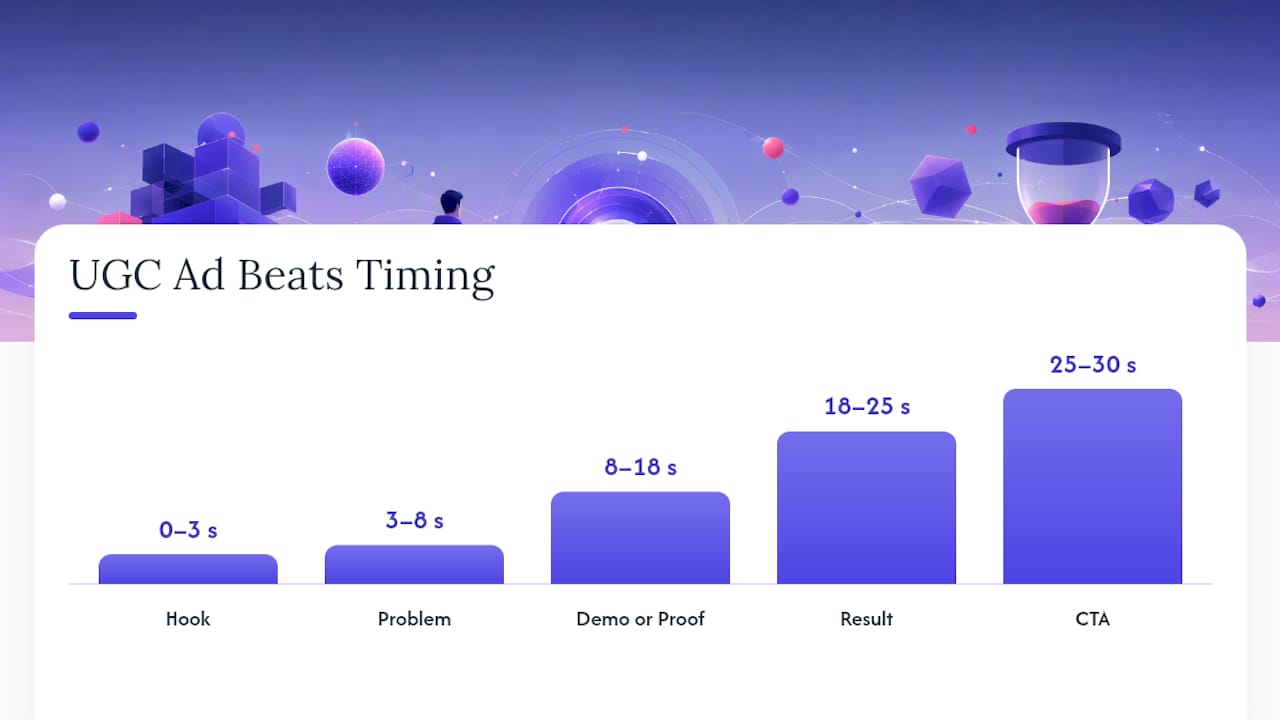
Hook (0 to 3 seconds). Its only job is to stop the thumb. No brand name, no "hey guys." Say something that makes the viewer think "wait, that's me" or "wait, what?" Example line: "I almost returned this three times before it actually worked."
Problem (3 to 8 seconds). Make it personal and specific, not generic pain-point copy. Example line: "My skin would break out every time I switched moisturizers, so I basically gave up trying new products."
Demo or Proof (8 to 18 seconds). Show the product doing the thing. This is where believability lives, not persuasion. Shot direction: hands-on-camera product use, a close-up of texture or result, a screen recording, or a side-by-side, framed with expert care for an effective visual flow using Personal Branding Services.
Result (18 to 25 seconds). State the payoff plainly. Skip superlatives; state the specific change. Example line: "Two weeks later, no breakouts, and I actually finish the bottle now."
CTA (25 to 30 seconds). Name the exact next action. "Link in the caption" beats "check it out."
For a 15-second cut, compress Problem and Demo into one breath and cut straight to Result. For a 60-second version (common on YouTube Shorts or Feed placements), you can add a second proof beat or a brief origin detail before the CTA, but don't pad the hook. The 5-part sequence still governs the pacing at any length.
A quick beat-by-beat checklist for drafting:
- Write the hook last, after you know what result you're proving.
- Keep the problem sentence under 12 words.
- Film the demo before you script it. Real footage often reveals a better line.
- State one measurable result. Vague claims read as fake.
- End on one action, never two.
Five Ready-to-Film UGC Script Templates You Can Adapt Today
Each template below is a full 20 to 30 second spoken script with three swappable hooks. Adjust the bracketed product details and film.
1. Testimonial Fits: skincare, supplements, subscription boxes, anything with a "before I found this" arc. Hooks to test: "I wasn't going to post this, but..." / "This is the third time I've bought this, so I guess I should say something." / "If you've tried everything for [problem], watch this." Script: "I've tried probably ten [product category] and none of them worked the way people said. Then a friend sent me [product], and honestly I was annoyed at how well it worked. [Specific result]. I'm not sponsored, I just wanted people to know." Shots: talking head in a car or bathroom mirror, product in hand, a quick before/after cut.
2. Problem to Solution Fits: any product solving a daily annoyance. Hooks: "Nobody tells you this happens after 30." / "I used to think this was just normal." / "POV: you finally found the fix." Script: "For years I dealt with [problem] and just assumed it was permanent. Turns out it wasn't, I just hadn't found [product]. Now I [specific new behavior]." Shots: reenact the annoyance, then the fix, then a relieved reaction shot.
3. Unboxing Fits: physical products with satisfying packaging or a "first impression" moment. Hooks: "This just showed up and I have thoughts." / "Unboxing the thing everyone's talking about." / "I ordered this at midnight, no regrets." Script: "Okay so this came in today. [Open box, react.] It's smaller/bigger than I expected. Let's see if it actually does what it says." Shots: package on doorstep, unboxing close-up, first use.
4. Before and After Fits: visual transformation categories like skincare, cleaning, home goods, fitness. Hooks: "Day 1 versus day 14, no filter." / "I almost didn't post the before picture." / "This is embarrassing but here's proof." Script: "This is what [problem area] looked like before. I used [product] for [timeframe], nothing else changed. This is now." Shots: split screen, same lighting and angle both times.
5. Tutorial Fits: anything with a technique or setup step. Hooks: "You're probably using this wrong." / "Here's the trick nobody explains." / "Three steps, that's it." Script: "Step one, [action]. Step two, [action]. Step three, [action]. That's the whole thing, and it's why it actually works for me." Shots: overhead or POV hands, numbered text overlays matching each step.
Which Hook Formulas Actually Stop the Scroll?
Hooks fall into five reliable categories: problem callout, curiosity gap, status flex, shock or contrast, and instant demo. Each wins with a different emotional trigger, so test across categories rather than three variations of the same idea.
- Problem callout: "If your [skin/back/inbox] does this, you'll relate." Works for pain-driven categories.
- Curiosity gap: "The thing nobody tells you about [category]." Strong on TikTok and Reels where novelty drives watch time.
- Status flex: "How I upgraded my [routine/setup] for under $50." Works for aspirational or lifestyle products.
- Shock or contrast: "I paid $200 for this when a $15 version does the same thing." Good for value or comparison plays.
- Instant demo: "Watch what happens when I [action]." Best when the product has a visual payoff in the first second.
Twelve to test across a batch: "I regret not buying this sooner." "This is not sponsored, I just need people to know." "POV: your first week using [product]." "Why is nobody talking about this?" "I asked my dermatologist and she said just use this." "This replaced four other products in my routine." "$12 versus $80, here's the difference." "The one thing that actually worked after trying everything." "I filmed this the second it arrived." "My [family member] stole this from me within a day." "This is either genius or ridiculous, you decide." "Watch this before you buy [category] again."
Pick three hooks per creative from different categories, not three near-duplicates, and assign each one a KPI to watch: stop rate for curiosity hooks, hold rate for demo hooks, click-through for status and shock hooks.
How Do You Brief a Creator or Prompt an AI for a Script?
Whether you're briefing a human creator or generating a first draft with AI, the inputs are the same. A tight brief prevents the two most common failures: scripts that sound like brand copy, and creators who go off-topic and waste a shoot.
Include these fields in every brief:
- Audience: one sentence describing who's watching, not a demographic chart.
- Core problem: the specific pain point this product solves, in the customer's own words if possible.
- Key benefit: the one result to prove, not a list of five features.
- Required shots: three to five specific shots you need back.
- Delivery voice: casual friend, expert peer, or skeptic converted. Pick one.
- Forbidden phrasing: brand jargon, superlatives, anything legal flagged.
- Usage rights: confirm in writing before the shoot, not after.
For AI-generated drafts, structure the prompt to return four things at once: three hooks from different emotional categories, a full spoken script broken into the five beats, shot directions for each beat, and two caption variations. AI tools genuinely speed this up, but only when the prompt forces conversational phrasing and explicit shot notes. A prompt that just asks for "an ad script" returns brand copy with contractions removed.
Pro Tip: Run the same prompt three times with a different creator persona each time (skeptical parent, busy professional, Gen Z first-timer). You'll get three usable drafts instead of one you have to rewrite twice.
Do You Need Legal Permission to Run Creator Content as an Ad?
Yes. Paid use of a customer's or creator's content requires explicit written permission before it runs as a paid ad, regardless of whether they tagged your brand or sent the clip unprompted. Platforms and copyright law both treat organic mentions and paid promotion as separate uses, and running someone's likeness in ad spend without documented consent creates real exposure.
Your checklist before any UGC content becomes an ad:
- Scope: exactly which platforms and placements the content can run on.
- Duration: a specific end date, not "indefinitely."
- Exclusivity: whether the creator can post similar content for competitors.
- Compensation: flat fee, commission, or product exchange, stated plainly.
- Attribution: whether the creator's name or handle appears.
- Replacement rights: what happens if the creator asks for removal later.
One-sentence permission template you can copy: "I grant [Brand] the right to use this content in paid advertising across [platforms] for [duration], in exchange for [compensation], and understand I can request removal after [notice period]." Trust in peer content is exactly why audiences respond to UGC in the first place, so protecting that trust with clean permissions is not optional.
How Should You Test and Scale a UGC Ad Script?
Watch four metrics in this order: hook rate (percentage who watch past 3 seconds), hold rate (percentage who watch to the CTA), click-through rate, and cost per acquisition. A weak CPA with a strong hook rate points to a landing page problem, not a script problem. Diagnosing at the creative level first saves you from rebuilding a page that was never the issue.
A simple test matrix: run 3 hooks across 2 creators against 1 control script, six variants total, with even budget split until each hits statistical relevance for your account size. Route every variant to the same landing page so you're isolating the script variable, not the funnel.
- Launch all six variants with equal spend for the first 48 to 72 hours.
- Kill anything with a hook rate below your account average within the first spend threshold.
- Scale the top one or two performers by increasing budget in increments, not all at once.
- Refresh the winner once hold rate or CTR drops noticeably from its first-week baseline, a common sign of creative fatigue setting in.
Treating UGC as performance creative rather than a one-off content favor is what separates accounts that keep a steady stream of winners from accounts relaunching the same three ads every quarter.
What Belongs on Your UGC Production Checklist?
Film vertical at 9:16, minimum 1080×1920, with burned-in captions and clean audio recorded close to the source, not room mic. 15 to 45 seconds is the sweet spot for Reels and Shorts placements, longer for Feed or YouTube.
Authenticity rules that actually matter: shoot on a phone, use natural light, and let the creator talk the way they'd talk to a friend, not read a script word for word. Ironically, a little imperfection, a jump cut, a slightly shaky frame, tends to read as more believable than a polished shot.
Editing rules to enforce:
- One idea per scene. Don't stack two claims in a single shot.
- Every text overlay adds new information; never just repeat the spoken line.
- Avoid color grading or motion graphics that make it look like a commercial.
- Keep the voice conversational all the way through the edit, not just in the script.
Delivery checklist for creators sending footage back: clear filenames by hook number, captions included as a separate file, one suggested thumbnail frame per clip, and exports at the correct aspect ratio for each platform you're testing.
Pro Tip: Ask creators to send one extra "safety" take of the hook line with a slightly different phrasing. Half the time it outperforms the version you scripted.
How a Managed VA Workflow Cuts UGC Production Time
Turning one raw creator video into a week's worth of testable ad variants is a coordination job, not a creative one, and coordination is exactly what a managed virtual assistant workflow replaces. Instead of a marketer manually re-cutting footage, writing new hooks, and formatting exports for three platforms, a dedicated VA team handles that pipeline in the background.
Teams adopting this managed virtual assistant workflow typically see rapid turnaround times from raw footage to finished ad variants, production of multiple distinct ad variations from a single raw video upload, and a reduction in cost per acquisition linked to consistent creative refresh.
For a marketer running the test matrix described above, that turnaround window is the difference between refreshing hooks weekly versus refreshing them once a quarter because the editing backlog never clears.
Why Tone Matters More Than Polish in a UGC Script
The dialogue in a UGC script has to sound like something a real person would actually say out loud, and most brand-written scripts fail this test in the first sentence. Read your draft aloud before filming. If you stumble on a phrase or it sounds like it belongs in a brochure, a real customer would stumble on it too.
Contractions matter more than people think. "I have not" reads as a script; "I haven't" reads as a person talking. Cut adjectives that sell instead of describe: "amazing," "incredible," and "game-changing" are brand words, not customer words. A real customer says "it actually worked" or "I was surprised," not "it revolutionized my routine."
Specificity is the other tell. "This helped my skin" sounds written. "I stopped breaking out around my chin after about ten days" sounds lived. Vague claims read as scripted because real people remember specific details, not general impressions, when something worked for them.
Let creators use their own filler words, false starts, and pauses where natural. A script that reads too clean on the page usually sounds too clean on camera. If you're briefing a creator rather than writing every line yourself, tell them the beats and the result to prove, then let them phrase it their own way. The best UGC scripts function more like an outline than a transcript, and the creator's real speech patterns are doing half the persuasive work.
Matching Script Tone to Who's Actually Watching
A script that works for a 45-year-old parent buying a home organization product will fall flat with a 19-year-old buying a skincare serum, even if the underlying five-part structure stays identical. Tone is the variable that shifts, not the framework.
For younger audiences (Gen Z, roughly 18 to 26), lean into faster pacing, more self-deprecating humor, and hooks that assume the viewer is skeptical of ads by default. Trends and audio references land here, but they age fast, so build scripts that don't depend entirely on a sound that will feel dated in a month.
For millennial and parent audiences, slow the pacing slightly and lean on practical proof over humor. This group responds to specific numbers, time savings, and a demonstrated result more than a punchy hook. They're also more tolerant of a slightly longer problem beat, since they've likely tried multiple failed solutions already.
For older or more skeptical buyers, credibility markers matter more than personality. A visible product close-up, an unedited demo, and a plain statement of result outperform anything that feels like a performance.
Match vocabulary too. If your customer base talks about "my routine," use that phrase in the script instead of "my regimen." If they say "it's a pain," don't rewrite it as "it's inconvenient." Pull actual language from reviews, support tickets, or comments before you write a single line. Borrowed language from your own customers will always beat invented dialogue that sounds like marketing wrote it.
The Mistakes That Quietly Kill a UGC Ad Script
Most failed UGC scripts share the same handful of problems, and almost none of them are about production quality.
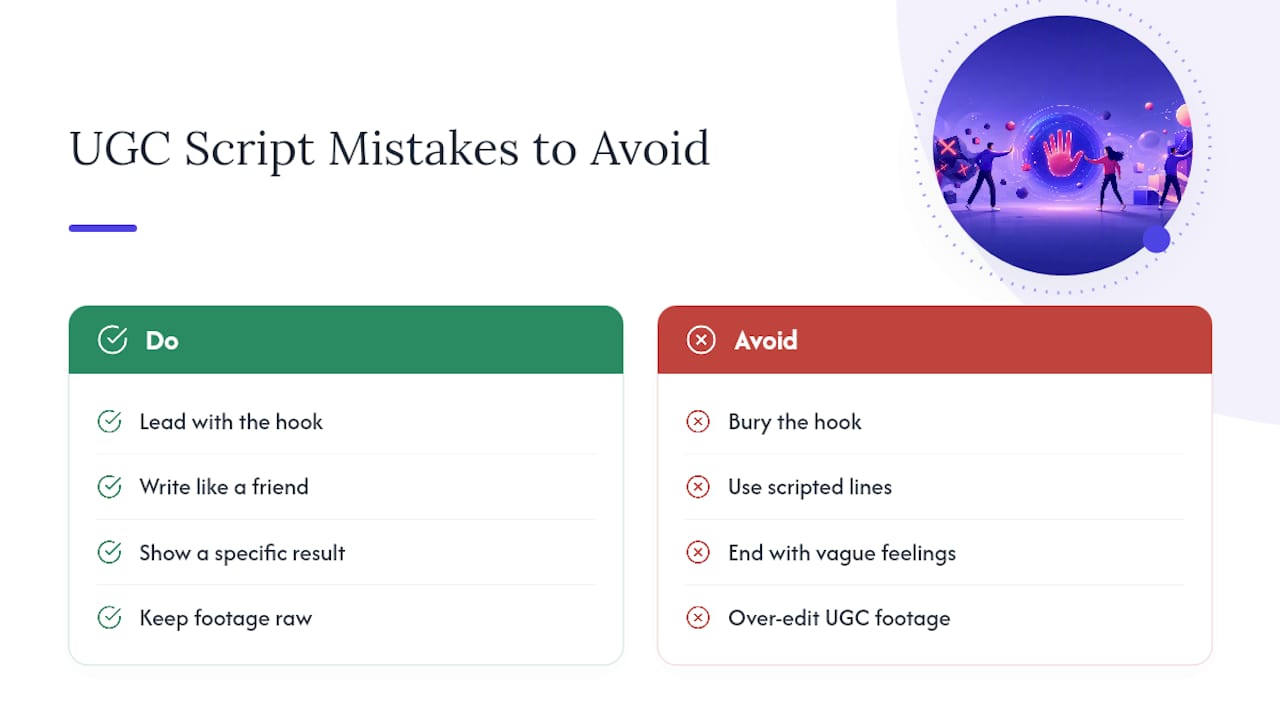
The most common mistake is burying the hook. If your script spends the first five seconds on a greeting, a brand mention, or setup before the interesting part, you've already lost the viewer. The hook has to be the very first thing said or shown, not a warm-up to it.
The second is writing dialogue no real person would say. Lines like "I've never felt more confident" or "this changed my life" read as scripted because they're the kind of thing brands want customers to say, not what customers actually say. If you wouldn't text that sentence to a friend, cut it.
The third is skipping the specific result. Scripts that end on a vague feeling instead of a concrete outcome underperform because viewers can't tell if the claim is real. "I feel better" convinces no one. "I stopped needing a nap at 2 p.m." does.
The fourth is over-editing footage that's supposed to feel raw. Color correction, music swells, and motion graphics on a UGC-style ad signal "this is an ad" the second they appear, undercutting the entire format's advantage.
The fifth is skipping legal permission because the content came from an organic post. Organic posting and paid promotion are different uses, and running one without documented rights for the other is a real risk, not a technicality.
The last is testing one script instead of a batch. A single script, no matter how well written, tells you almost nothing. Structure and specific outcome matter more than any single clever line.
Structure Beats Talent in UGC, and Almost Nobody Believes That
Most advice on UGC scripts focuses on finding the "right" creator or chasing an elusive sense of authenticity, as if some people are just naturally better on camera. That's backwards. The scripts that convert consistently aren't the ones with the most charismatic talent. They're the ones with the tightest structure, tested in enough variations to find a winner by data instead of gut feeling.
The overrated part of this whole category is the obsession with "authenticity" as a vague vibe. Authenticity isn't a feeling you chase, it's a byproduct of specific dialogue, real footage, and a hook that doesn't waste the viewer's first three seconds. Treat the script like direct-response copy wearing casual clothes, because that's what it is.
What most teams should prioritize first isn't a better creator or a bigger budget. It's a faster testing cadence. A mediocre script tested six ways beats one "perfect" script run alone every time, because you can't know which hook actually works until the data tells you. If your production pipeline can't turn one raw video into several testable variants within a couple of days, that bottleneck matters more than any line of dialogue you're agonizing over.
— James
Skip the Bottleneck: Turn One UGC Clip Into a Week of Ad Variants
This managed virtual assistant team offers an alternative to traditional creative agencies for UGC ad production, turning one raw creator video into multiple testable ad variations quickly, allowing marketers to run hook-testing matrices without waiting weeks for fresh cuts.
That turnaround is built specifically for the creative fatigue problem this article walks through: a script only stays effective for so long before performance drops, and teams that can refresh weekly consistently outperform ones stuck relaunching the same three ads.
If your current bottleneck is turning one good UGC clip into enough variants to actually test properly, see how the weekly hook workflow works and check whether it fits your current production pace.
Sources
- What are UGC ads — Feefo Business resources
- UGC Script Template: Write Ready-to-Film Scripts in 5 Minutes — HookMafia
- UGC ads explained — Asset Academy
- 4 types of UGC ads and how to collaborate on UGC ads — Shopify
FAQ
What Are Some Good UGC Ad Examples?
Strong examples share the same shape: a testimonial that opens with a relatable problem, an unboxing with genuine first reactions, or a before-and-after with visible proof. The five-part structure (Hook, Problem, Demo, Result, CTA) is what makes these examples work regardless of the product category.
Are UGC Ads Legal to Run as Paid Advertising?
Yes, but only with explicit written permission from the creator or customer before the content runs as a paid ad. An organic post or tag does not automatically grant rights for paid promotion, so brands need a signed usage agreement covering scope, duration, and platforms.
What Makes a Good Script for UGC Video Ads?
A good UGC script opens with a hook in the first three seconds, states a specific problem, shows believable proof, states one measurable result, and closes with a single clear action. Scripts that sound conversational, using contractions and specific detail instead of brand language, consistently outperform polished ad copy.
Where Can I Find Free UGC Script Templates?
Template libraries like HookMafia and Reloop offer free structures covering testimonial, unboxing, and before-and-after formats. For teams that need finished variants fast rather than a starting template, a managed service like Jamesyee's workflow turns one raw video into several ready-to-test edits quickly.