
The safe default is 9:16 vertical at 1080x1920, exported as an H.264 MP4 or MOV, kept under 500 MB (aim for under 100 MB in practice), with a bitrate of at least 516 kbps and closer to 2,500+ kbps if there's on-screen text or product detail. Runtime can range from 5 to 60 seconds, but 9 to 15 seconds performs best for most paid placements.
Three placement types change these numbers: In-Feed (Auction, which is flexible, versus Reservation, which is stricter), TopView (full-screen, open-app), and Spark Ads (which inherit specs from an existing organic post rather than a fresh upload).
Screenshot-ready checklist:
- Vertical 1080x1920, H.264 MP4/MOV
- Under 100 MB, bitrate 2,500+ kbps
- 9 to 15 seconds for auction placements
- Critical text and logos inside the center safe zone
Key Takeaways
Compliant TikTok video ads start with a 9:16 vertical master at 1080x1920, exported as H.264 MP4 under 100 MB with a bitrate above 2,500 kbps, then adjusted per placement.
| Point | Details |
|---|---|
| Default export settings | Vertical 1080x1920, H.264 MP4/MOV, under 100 MB, bitrate 2,500+ kbps. |
| Placement changes the rules | In-Feed, TopView, and Spark Ads each carry different duration and format requirements. |
| Safe zones are non-negotiable | Keep text and logos inside the center 60% of frame, away from UI icons and the product card. |
| Bitrate causes most rejections | Low bitrate and format mismatches reject or degrade more ads than content policy issues. |
| Scaling variants without slowdown | Jamesyee's managed VA service turns one raw video into multiple placement-ready exports within 24 to 48 hours. |
Table of Contents
- TikTok Video Ad Specs for In-Feed: Auction vs. Reservation, Spark vs. Non-Spark
- What Are the TopView Ad Specs on TikTok?
- What Other TikTok Ad Formats and Their Specs Should You Know?
- How Do You Keep Text and Logos Out of TikTok's UI Overlays?
- Why Do TikTok Ads Get Rejected, and How Fast Is Review?
- How Do You Produce Multiple Compliant TikTok Ad Variants Fast?
- Convert One Video Into a Full Set of Compliant TikTok Ad Variants
- Frequently Asked Questions About TikTok Video Ad Specs
- Sources
TikTok Video Ad Specs for In-Feed: Auction vs. Reservation, Spark vs. Non-Spark
In-Feed ads accept three aspect ratios, but they are not created equal. Vertical 9:16 is the recommended format and the one built for TikTok's full-screen scroll. Square 1:1 and landscape 16:9 are technically supported, but they run smaller in the feed and leave dead space on either side.
Minimum pixel dimensions matter more than most editors realize, because falling below them triggers automatic upscaling that softens detail. For vertical, the floor is 540x960, though 1080x1920 is what you should actually be exporting. Square needs at least 640x640. Landscape needs at least 960x540.
Duration limits split by buying method. Auction In-Feed ads can technically run up to 10 minutes in some feeds, but nobody should be building 10-minute paid ads. Reservation In-Feed sticks to a tighter 5 to 60 second window. In both cases, 9 to 15 seconds is the sweet spot for direct-response performance, while 15 to 30 seconds gives more room for storytelling formats.
File formats accepted include MP4 and MOV primarily, with some placements accepting other common video formats. Stick with MP4 using H.264 video and AAC audio. It's the most reliable container across TikTok's transcoding pipeline.
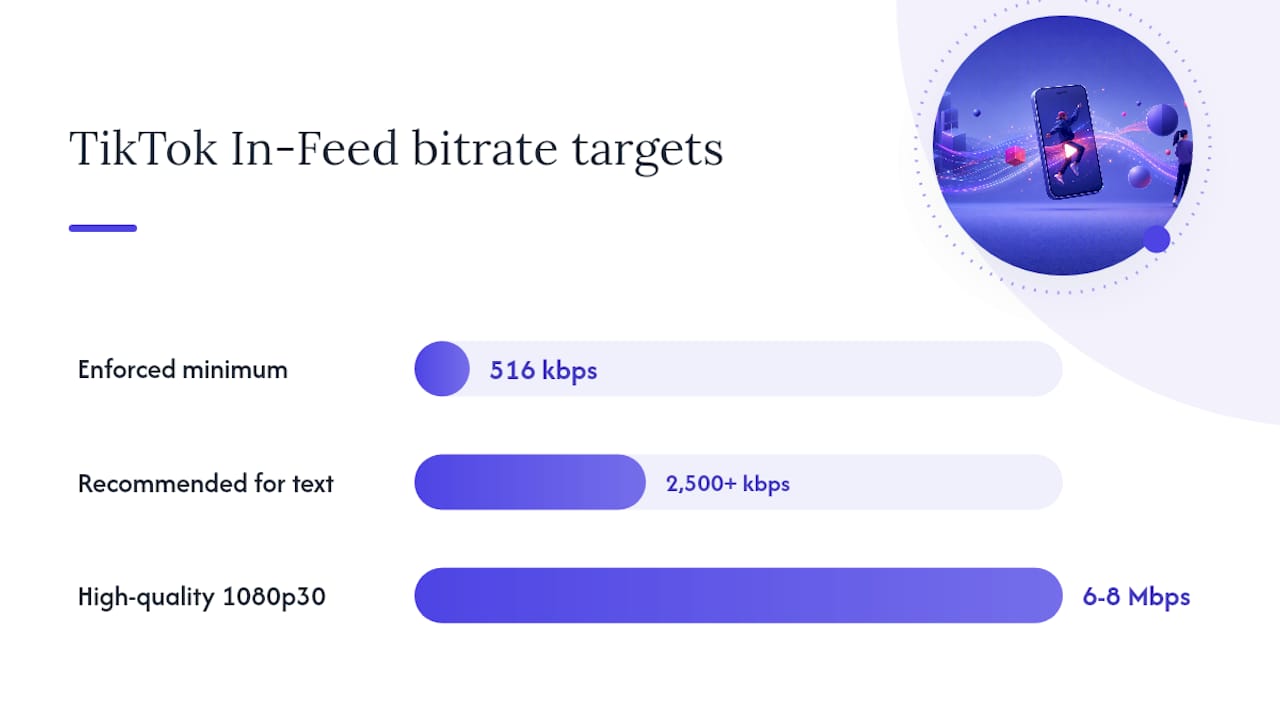
On file size, TikTok's stated ceiling is 500 MB, but that number is a ceiling, not a target. Keep exports under 100 MB when you can. Bitrate has a real floor too: TikTok enforces roughly 516 kbps as a minimum, but you want more than that if there's readable text or product packaging on screen, ideally 2,500+ kbps and up to 6 to 8 Mbps for a clean 1080p30 export. Frame rate should sit at 24 to 30 fps for standard content, climbing toward 60 fps only for fast motion or sports footage.
| Field | Recommended value |
|---|---|
| Aspect ratio | 9:16 (1:1 and 16:9 also accepted) |
| Minimum resolution | 540x960 vertical / 640x640 square / 960x540 landscape |
| Recommended resolution | 1080x1920 |
| Duration | 5 to 60s (up to 10 min in auction feeds); 9 to 15s recommended |
| Max file size | 500 MB (target under 100 MB) |
| Bitrate | 516 kbps minimum; 2,500+ kbps recommended |
The Spark versus non-Spark distinction trips up more teams than any spec on this list. Spark Ads boost an existing organic post, so the ad inherits that post's aspect ratio, caption, length, and creator handle. You can't reformat it after the fact. Non-Spark, standard In-Feed ads require a fresh upload where you control the brand name, profile image, and caption independently of any organic content.
Pro Tip: Keep one high-quality master project per concept, then export two versions before you ever touch Ads Manager: a clean cut with no text, and a second with your CTA and captions burned in. Preview both in Ads Manager's safe-zone overlay before scheduling, so you catch cropping issues while they're still cheap to fix.
What Are the TopView Ad Specs on TikTok?
TopView is the full-screen takeover that greets users the moment they open the app, and it plays by stricter rules than standard In-Feed. It requires 9:16 vertical, no exceptions, with 1080x1920 as the recommended resolution. There's no square or landscape fallback here.
Duration typically runs 5 to 60 seconds under a reservation buy, with 9 to 15 seconds recommended for maximum completion rate. File formats and the 500 MB size cap follow the same rules as In-Feed, but because TopView is a premium, high-visibility placement, aim higher on bitrate. A clean 2,500+ kbps export protects text and branding from looking soft on a screen that's getting undivided attention.
Reservation buys for TopView often need creative locked in 2 to 5 business days ahead of the flight date. Treat that window as fixed, not flexible, and build your review buffer around it rather than around your ideal launch date.
Quick TopView checklist:
- 9:16 vertical only, 1080x1920 recommended
- 5 to 60 seconds, 9 to 15 seconds for performance
- Same 500 MB cap as In-Feed, but export cleaner (2,500+ kbps)
- Submit early. Reservation approval is slower than auction review
- Design the frame so nothing critical sits where UI icons appear
What Other TikTok Ad Formats and Their Specs Should You Know?
A handful of secondary formats show up often enough in briefs that they deserve their own quick reference.
Brand Takeover is the legacy full-screen format, typically a short 3 to 5 second video or static frame that appears before In-Feed content loads. Video Shopping and Collection cards follow standard In-Feed video specs, but the product card overlay eats into your bottom safe zone. So, anything you'd normally place low in the frame needs to move up. Playable ads package as HTML5 files with their own size ceilings, separate from standard video specs, and need testing on the actual placement before launch. Pangle, TikTok's audience network, sometimes renders creative differently than the native app, so it's worth testing a 1:1 or alternate 9:16 crop specifically for that inventory.
Spark Ads deserve one more mention here: because they boost an organic post directly, they can technically run in any ratio the original post used. Vertical still wins on the For You Page regardless of which format boosted it there.
- Brand Takeover: 3 to 5 second full-screen video or static
- Video Shopping: standard In-Feed video specs, reduced bottom safe zone
- Playable ads: HTML5 packaging, test before scaling spend
- Pangle: verify rendering with a native or alternate crop before launch
How Do You Keep Text and Logos Out of TikTok's UI Overlays?
The center of the frame is the only real estate TikTok guarantees you. Everything around the edges competes with the app's own interface: the caption stack at the bottom, the like and share icons on the right, and account information near the top.
On a standard 1080x1920 canvas, that translates roughly to a centered safe area around 900x1200 pixels. If your ad runs with a Shopping product card attached, shrink that bottom margin further. The card can eat another 80 to 100 pixels along the bottom edge, which is enough to clip a poorly placed CTA button entirely. TikTok's Ads Manager includes downloadable safe-zone overlay templates. Use them rather than eyeballing it.
On-screen text needs enough size and contrast to survive a small phone screen glanced at during a commute: bump font weight up, add a background bar behind white text on busy footage, and always upload as a private post first to check it on two or three different phones before it goes live.
Because most viewers watch with sound off, the first two seconds need to sell the hook visually, with no dependence on audio. Burned-in captions are more reliable for guaranteed placement, while TikTok's dynamic auto-captions save editing time when style consistency matters less than speed.
Pro Tip: Keep a single clean master export, then layer localized captions as a separate asset per market. That way one video becomes five language variants without a single re-export of the underlying footage.
Why Do TikTok Ads Get Rejected, and How Fast Is Review?
Most rejections trace back to a handful of repeat offenders: wrong container or unsupported codec, bitrate that dips below the platform floor, an aspect ratio that forces awkward auto-cropping, on-screen text sitting under the UI icon stack, or copyrighted audio without proper licensing.
Before uploading, confirm four things: the export is H.264 MP4, the bitrate clears your target, the safe-zone overlay in Ads Manager shows no clipped elements, and any music track is cleared for commercial use. Auction creatives generally clear review faster than reservation buys, which need that 2 to 5 business day runway. Build QA time into your timeline instead of treating it as a rounding error.
Bitrate and file-format mismatches account for more rejected or degraded-delivery ads than any content policy issue. A file that technically uploads but plays back soft or blocky is often a bitrate problem, not a creative one.
- Confirm H.264 MP4/AAC before export
- Check bitrate against the 516 kbps floor, 2,500+ kbps target
- Run the Ads Manager safe-zone preview
- Verify music licensing before flight
TikTok Ad Specs Cheat Sheet by Placement
Copy-paste checklist for your editor: master exported at 1080x1920, safe-zone template applied, private preview tested on two devices, caption under 100 characters, file under 100 MB.
How Do You Produce Multiple Compliant TikTok Ad Variants Fast?
- Ingest the raw footage and cut a vertical 1080x1920 master first, before anything else.
- Build two exports per concept: one clean, one with captions and CTA burned in.
- Localize captions as separate overlay assets on top of the same clean master.
- Check each export against the Ads Manager safe-zone overlay.
- Upload as a private post and preview on at least two phones before going live.
Standardize file naming by concept, ratio, and language so a batch of twelve variants doesn't turn into a guessing game by Friday afternoon.
Pro Tip: A layered project template, where captions and CTAs sit on their own track above the locked master, means swapping a headline takes minutes instead of a full re-export.
What marketers actually need from a specs page
Specs aren't creative handcuffs. They're production constraints that let you test faster without guessing which cut will get flagged. Build vertical-first, treat the safe zone as a requirement, not a suggestion, and the technical side stops being the bottleneck.
Convert One Video Into a Full Set of Compliant TikTok Ad Variants
Building even three placement-correct exports (In-Feed, TopView, Spark) from a single piece of raw footage eats a full day for most in-house teams once you factor in safe-zone checks and caption localization. Jamesyee's virtual assistants handle that turn, converting one video into multiple ad variations with managed QA against the exact specs covered above, typically delivered in 24 to 48 hours.
That's the trade: instead of an editor manually rebuilding exports for every placement and language, you hand off the raw file and get back a set of compliant variants ready for Ads Manager. Teams using this model to keep creative fresh have seen a 31% reduction in cost per acquisition, since fresh variants fight ad fatigue better than one asset stretched across every placement. If your team is buried in re-exports instead of strategy, check how the service works for your next batch of TikTok creative.
Frequently Asked Questions About TikTok Video Ad Specs
What is the safest default aspect ratio for TikTok video ads? Vertical 9:16 at 1080x1920 works across nearly every placement and is the only accepted ratio for TopView.
What's the maximum file size for a TikTok video ad? TikTok's stated cap is 500 MB, but exports under 100 MB upload more reliably and transcode more cleanly.
How long should a TikTok ad be? Most placements accept 5 to 60 seconds, with 9 to 15 seconds performing best for direct-response campaigns.
Do Spark Ads follow the same specs as regular In-Feed ads? No. Spark Ads inherit the aspect ratio, caption, and length of the organic post they boost, rather than following a fresh upload's rules.
What causes most TikTok ad rejections? Low bitrate, unsupported codecs, aspect ratios that force bad cropping, and text sitting under UI icons or the product card.
Sources
- TikTok video ad specs: Sizes, formats, and safe zones
- TikTok Ad Specs 2026: Video Sizes, Spark Ads & Safe Zones | Vizup
- TikTok ad specs: every format, dimension, and requirement in one reference | rule1
- TikTok Image & Video Sizes Guide (2026)