

Product demo ads show a product actually being used, often in the first few seconds, and they consistently outperform static or feature-list creative on relevance and click-through. The core payoff for marketers: better communication of what a product does, higher persuasion scores, and a lower cost per acquisition. The sections below cover which formats to test, where to place them by platform, and a production process you can run this week.
TL;DR:
- Benefit demos significantly increase relevance and persuasion scores, with a roughly 17-point rise in communicating new information and 15 points in relevance.
- Short social and UGC demos are most effective for top-of-funnel awareness, especially when the product is shown within three seconds for maximum engagement.
- Interactive product tours and embedded demos reduce cost-per-acquisition by allowing prospects to self-qualify and explore the product before converting.
- Testing sitelinks, CTA swaps, and shorter formats before investing in full-production helps validate the concept and optimize spending effectively.
- Creative ideas that embed the demonstration in entertaining or surprising content outperform simple feature showcases, regardless of budget.
Table of Contents
- Why Product Demo Ads Outperform Standard Creative
- Which Demo Format Fits Your Goal and Budget
- Best Platforms and Placements for Demo Ads
- How to Produce a Demo Ad That Actually Converts
- What Actually Worked: Two Short Case Patterns
- Measuring and Optimizing Your Demo Ad Performance
- Why Most Marketers Get Demo Ads Wrong
- A Faster Way to Keep Demo Ads Fresh
- Sources
- FAQ
Why Product Demo Ads Outperform Standard Creative
The persuasion research backs this up with real numbers. Kantar's analysis of its Link database found ads that demonstrate product benefits score 17 points higher on communicating new information and 15 points higher on relevance compared to ads that skip the demo entirely. Roughly 75% of ads in that database already include some form of demonstration, so the format is common. The gap comes from execution, not novelty.
Kantar's persuasion data: Ads showing product benefits gain +17 points on communicating new information, +15 points on relevance, and +12 points on persuasion versus non-demo ads. Demos showing what a product is made from add roughly +10 points on persuasion.
Different demo types map to different outcomes:
- Benefit demos (showing the product solving a problem) drive the strongest relevance and persuasion lifts.
- "What it's made from" demos build trust and work well for food, beauty, and materials-heavy products.
- Well-made demos also lift brand affinity and perceived ability to meet customer needs by 10 to 14 points, according to the same Kantar data.
That last point matters for anyone running upper-funnel campaigns. A demo doesn't just sell the click. It changes how people feel about the brand afterward.
Which Demo Format Fits Your Goal and Budget
Not every product needs a cinematic video demo. Match the format to what you're trying to prove and how much time you have.
- Short social demos (15 to 30 seconds): Best for cold audiences and top-of-funnel attention. Show the product working within the first three seconds, no setup required.
- UGC and unboxing demos: A creator or customer opens the box and reacts in real time. These read as authentic rather than scripted, which helps with skeptical or comparison-shopping audiences.
- Interactive demos and product tours: Let prospects click through actual product functionality instead of watching passively. Navattic's guidance on ad best practices shows these work especially well for software or anything with a learning curve, since the viewer proves the value to themselves.
- Website and long-form demos (45 to 90 seconds): Better suited to owned channels where the visitor already clicked through and wants depth before converting.
Pro Tip: Don't build four formats from scratch. Shoot one solid raw demo, then cut it down into a 15 second hook, a 30 second social edit, and a longer explainer. One shoot, three tests.
Best Platforms and Placements for Demo Ads
Platform choice changes both the format and the pacing. Here's how to sequence your tests, starting cheap and working up to bigger production investments.
- Start with sitelinks and CTA swaps. Before shooting anything new, add a demo link to an existing Google ad's sitelinks or swap the CTA in a social ad to point at a demo. This is the lowest-effort way to gauge interest before investing in production.
- Match pacing to feed type. Feed placements tolerate a few seconds of setup; Stories and Reels need the payoff visible almost instantly, with captions since most viewers watch on mute.
- Front-load YouTube demos. The first three to five seconds decide whether a viewer skips. Pair that with a thumbnail that shows the product mid-action, not a logo card.
- Use LinkedIn as a teaser, not the full demo. Post a short clip that raises the question, then link out to an interactive demo or landing page for the full walkthrough. B2B buyers rarely convert off a 15 second clip alone.
- Embed interactive demos on landing pages once you have signal. After a sitelink or CTA test shows a demo format is pulling clicks, invest in an embedded, clickable product tour on the landing page itself, following best practices on how to embed Facebook on a website for seamless integration. Navattic's data suggests this can meaningfully lift both click-through and conversion once prospects can explore the product without booking a live call.
Interactive demos also skew heavily toward certain platforms. Kantar found interactive demo formats show up in 43% of YouTube ad campaigns, compared to 35% on Instagram and 33% on Facebook, which tells you where audiences are already primed to engage with hands-on product content.
How to Produce a Demo Ad That Actually Converts
Good demo ads follow a repeatable structure. Skip the brainstorming and start with these steps.
- Pick one KPI before you shoot anything. CTR, view-through rate, or CPA. Trying to optimize for all three at once produces mediocre creative that satisfies none of them.
- Choose channel and length together. A 15 second TikTok hook and a 90 second website demo are different scripts, not the same video trimmed differently.
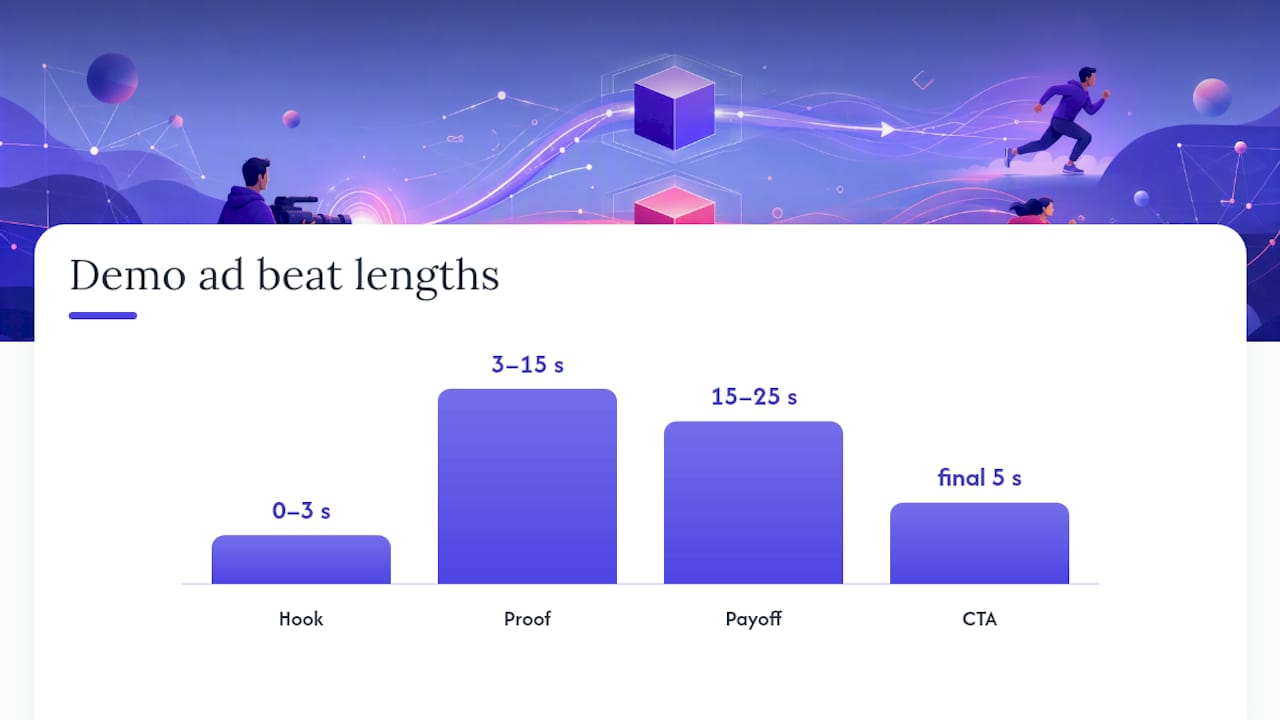
- Write to a four-beat structure:
- Hook (0 to 3 seconds): Show the product doing the thing, no intro, no logo.
- Proof (3 to 15 seconds): The specific feature or moment that makes this product different.
- Payoff (15 to 25 seconds): The result, transformation, or "aha" the viewer wants.
- CTA (final 5 seconds): One clear next step, not three.
- Build your asset list before filming: screen recordings if it's software, tight product close-ups, before/after shots, and captions burned in for sound-off viewing.
- Edit for modularity. Cut your master file into channel-specific lengths right away instead of re-editing later. Pippit's demo advertisement guidance recommends roughly 20 to 45 seconds for social cuts and 45 to 90 seconds for website or YouTube placements, built from the same source footage.
Pro Tip: Shoot three alternate hooks in the same session while your setup is still lit and your product is still on camera. You'll thank yourself when the first hook underperforms and you need a swap ready in an hour, not a week.
Stick to those duration ranges as defaults, then adjust once your own CTR data tells you otherwise.
What Actually Worked: Two Short Case Patterns
Two recurring patterns show up across demo ad performance data and industry write-ups.
- Interactive product tours reduce CPA by letting prospects self-qualify. Instead of gating a feature behind a form, an embedded, clickable walkthrough lets the viewer explore before committing, which tends to filter out low-intent clicks before they hit the funnel.
- Short UGC-style demos lift view-through and conversion on social. A creator holding the product and reacting naturally reads as less like an ad, which keeps viewers watching past the first few seconds instead of scrolling past.
- The creative idea matters more than the budget. Forbes' rundown of historically effective product demos points out that some of the most memorable demo ads ever made ran on modest budgets. What made them work was embedding the demonstration inside a genuinely entertaining or surprising moment, not a spec sheet.
The lesson to borrow from all three: prove the product works, but do it inside something worth watching.
Measuring and Optimizing Your Demo Ad Performance
Run demo ad tests the same way you'd run any other paid creative test, with a defined hypothesis and a decision point, not an open-ended vibe check.
- Set a hypothesis first. "A benefit demo will beat our static carousel on CTR by at least 20%" is testable. "Let's see how this performs" is not.
- Test one variable per variant set — hook, CTA wording, or demo type — so you know what actually moved the number.
- Watch CTR and view-through rate for early signal, but weight your final decision on CPA and assisted conversions, since attention doesn't always convert.
- Set a measurement window before launch (typically 7 to 14 days depending on spend) so you don't call a winner on day two.
Ads that demonstrate product benefits show a persuasion increase of roughly 12 points on average, per Kantar's Link database findings, which gives you a rough benchmark for what a genuinely strong demo variant should beat.
Refresh creative on a fixed cadence rather than waiting for CTR to visibly collapse. Swap hooks first, since that's the cheapest lever, before reshooting the whole demo.
Why Most Marketers Get Demo Ads Wrong
The mistake I see most often isn't a bad demo. It's treating the demo as the whole ad instead of the proof inside a better idea. Marketers shoot a competent screen recording or product close-up, slap a CTA on the end, and wonder why performance is flat. The Forbes retrospective on classic demo ads makes this obvious in hindsight: budget was never the deciding factor. The idea wrapped around the demonstration was.
The second mistake is sequencing. Teams jump straight to expensive interactive product tours before they've validated the concept with a sitelink or a CTA swap, which costs nothing and tells you fast whether the format resonates.
I've watched performance teams burn weeks on production before they've tested a $0 sitelink experiment. Wing Assistant's model exists because most in-house teams don't have the hours to cut a dozen variants of one raw video. A managed partner like this makes the most sense once you've validated a demo concept and need volume, not before you've tested the idea itself.
— James
A Faster Way to Keep Demo Ads Fresh
There are services that offer alternatives to hiring a full in-house editing team or paying agency rates for a handful of video edits a month. Instead of waiting days for a single cut, these services can take one raw demo video and turn it into multiple ad-ready variations, often within a day or two, so marketers can keep testing hooks and formats without the production pipeline becoming the bottleneck.
This fits performance marketers and e-commerce teams who already know demo ads work but don't have the bandwidth to keep cutting new versions every week. If creative fatigue is quietly capping your campaign performance, see how a managed creative workflow can get you fifteen or more fresh hooks running every week, starting with your very next demo shoot.
Sources
- Product demos in advertising; how to get them right
- Ad Best Practices for Product Demos
- 8 Of The Best Product Demos Ever And Why They're So Effective
FAQ
Can you give me an example of a product demo ad?
A product demo ad might show a blender crushing ice and fruit in real time, then cut to someone drinking the smoothie, all within 15 seconds. Some of the most effective examples in advertising history embedded that kind of demonstration inside a genuinely entertaining moment rather than a plain feature walkthrough, according to Forbes' retrospective on classic demo ads.
What does "product demo" mean in advertising?
A product demo in advertising is any creative that shows a product actually being used or its benefit actively happening, rather than describing it in text or through a spokesperson. It can be a screen recording, an unboxing clip, an interactive walkthrough, or a simple close-up of the product working.
How do I advertise a product sample or demo effectively?
Lead with the product in action within the first three seconds, since that's what determines whether a viewer keeps watching. Pair the visual with a clear, single call to action and test the same footage across a few different lengths and hooks before committing budget to one version.
How do you actually create a product demo ad from scratch?
Start by picking one KPI, one channel, and one duration, then script to a four-beat structure: hook, proof, payoff, CTA. Shoot your raw footage once, then edit it into multiple channel-specific cuts, a process teams often speed up with managed creative production support when in-house bandwidth runs short.
Do interactive demos work better than video demos?
They serve different purposes rather than one beating the other outright. Video demos win on attention and reach in feed placements, while interactive demos tend to perform better lower in the funnel, since they let prospects explore functionality directly instead of watching it happen to someone else.