

A paid social creative workflow is the defined sequence teams use to move ad concepts from brief to published placement, covering intake, production, review, and publishing. The single change that speeds this up more than any other tool purchase: pair a standardized creative brief with automated multi-format output and a fast, single-round approval loop. Everything below breaks that insight into a working system.
TL;DR:
- Pairing a standardized creative brief with automated multi-format output reduces production time and prevents creative fatigue by enabling faster, more varied ad testing.
- Building aspect ratio grouping into production and scripting early minimizes manual cropping, ensuring consistent quality across platforms like Meta, TikTok, and LinkedIn.
- Clearly defining roles such as creator, reviewer, and approver, along with structured feedback and a strict brief gate, accelerates review cycles and prevents delays.
- Implementing a managed virtual assistant workflow allows rapid batch production of ad variants, resulting in a 31% average reduction in cost per acquisition.
- Regular testing of new creative variants every one to two weeks and strict retirement rules help control fatigue, especially when combined with audience segmentation and rotation scheduling.
Table of Contents
- What Is a Paid Social Creative Workflow and Why It Matters
- How Should a Creative Brief Be Structured?
- How Do You Produce Multiple Ad Formats at Scale?
- Who Should Review and Approve Paid Social Creative?
- How Do You Map Approved Creative to Ad Platforms?
- What Tools Do You Need for a Connected Workflow?
- How Often Should You Test and Retire Creative?
- What Does a Managed VA Workflow Look Like in Practice?
- How Do You Manage Creative Versions and Archives?
- How Do You Keep Brand Guidelines and Compliance in Check?
- How Do You Set Realistic Deadlines for Each Phase?
- What Else Reduces Ad Fatigue Beyond Producing More Creative?
- How Should Teams Communicate During the Creative Process?
- How Do You Define Roles on a Creative Team?
- The One Workflow Change Most Teams Skip
- A Faster Way to Turn One Video Into a Week of Ads
- Sources
- FAQ
What Is a Paid Social Creative Workflow and Why It Matters
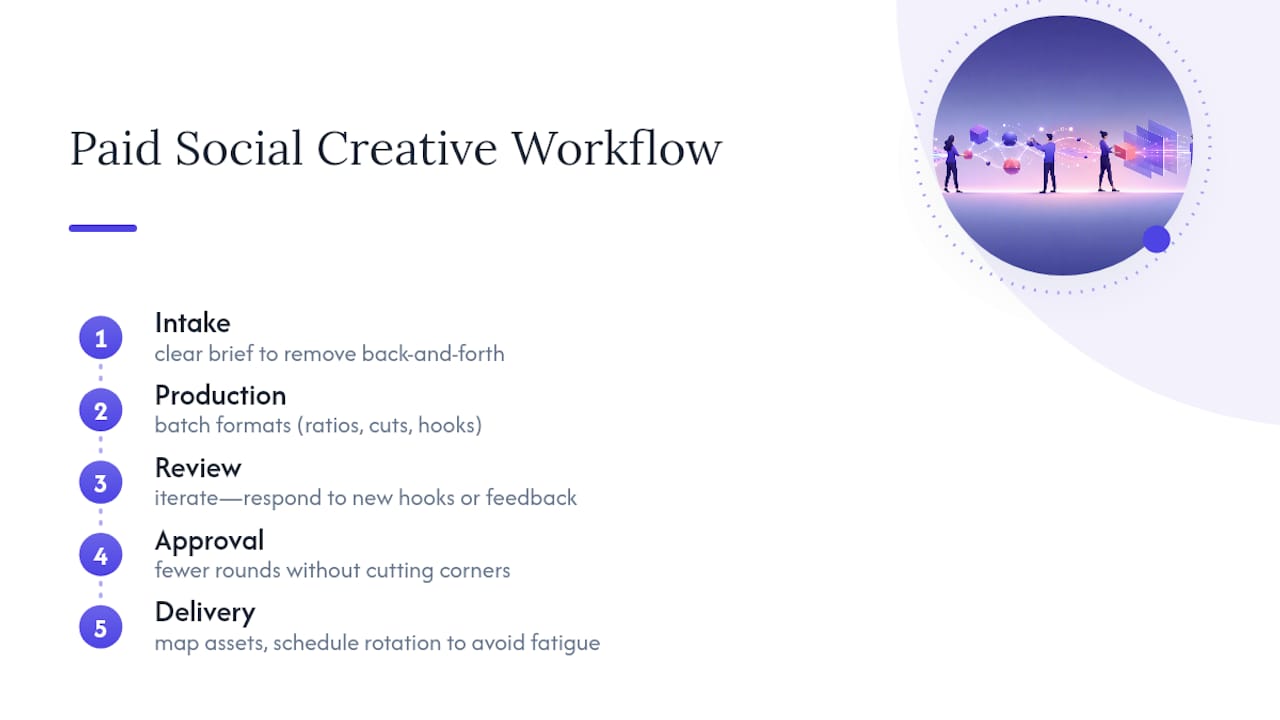
A creative workflow for social campaigns is not the same discipline as general project management, even though the software often looks identical. A product launch roadmap moves in a straight line. Creative work loops. Reviewers ask for a different hook halfway through editing. A client changes the offer the night before launch. An algorithm update makes last week's winning format irrelevant this week. Creative workflow management exists precisely because this kind of work needs defined phases that can absorb iteration without collapsing into chaos: intake, production, review, approval, and delivery.
Paid social adds a layer general creative work doesn't have: volume pressure. A single campaign brief on Meta or TikTok might need six aspect ratios, three hook variants, and two length cuts before it ever reaches an ad set. Miss that volume and you get creative fatigue, the point where frequency climbs, click-through rate drops, and cost per acquisition creeps upward because the same three ads have been shown to the same audience too many times.
A structured workflow fixes three things at once. It shortens the time between "we need an ad" and "the ad is live," because nobody is waiting on a Slack thread to find out what the brief actually said. It produces more testable variants per concept, because format multiplication gets built into production instead of bolted on afterward. And it lowers CPA over time, since fresh creative entering rotation on a schedule beats a handful of ads running until performance collapses.
The rest of this guide walks through each phase: how to write a brief that removes back-and-forth, how to batch production for multiple formats, how to cut approval rounds without cutting corners, how to map assets to platform placements, which tools actually matter, and how to build a testing cadence that keeps creative rotating before fatigue sets in.
How Should a Creative Brief Be Structured?
Most delays in paid social production don't happen in editing. They happen before editing starts, when a request lands with half the information a team needs and someone has to chase down the rest. Standardized intake forms solve this by forcing the requester to answer the questions production would otherwise ask mid-project.
A brief built for paid social needs more than the basics. At minimum, require these fields before a request enters the queue:
- Objective: awareness, conversion, retargeting, or app install, since all shapes pacing and hook style differently.
- Audience: cold, warm, or lookalike, plus any demographic or interest detail that affects tone.
- Primary KPI: CTR, CVR, CPA, or thumb-stop rate, so production knows what "success" looks like before the first cut.
- Source assets: raw footage, product shots, existing brand assets, and where they live.
- Mood or reference examples: two or three ads or videos that show the desired energy, pacing, or visual style.
- Required placements: Feed, Stories, Reels, TikTok For You, LinkedIn feed, and whatever else applies.
- Deadline and launch date: not the same thing. A launch date with no production deadline guarantees a rushed last 48 hours.
Once the fields exist, gate the queue so incomplete briefs never enter production. A request missing the KPI or the deadline gets bounced back automatically instead of sitting half-answered in someone's inbox. Pair that gate with a simple priority score, weighting urgency, campaign spend, and strategic importance, so the team always knows what to work on next instead of defaulting to whoever asked loudest.
Automated reminders close the loop. When a brief sits untouched for 24 hours, or a reviewer hasn't responded to an approval request, a scheduled ping keeps the queue moving without a project manager manually chasing every stalled item.
Pro Tip: Build your brief template with conditional fields. If the objective is "retargeting," the form should auto-require an exclusion audience field. If it's "cold prospecting," it should require a hook reference. Static templates miss context that dynamic ones catch automatically.
How Do You Produce Multiple Ad Formats at Scale?
The math of paid social production is brutal if you approach it one asset at a time. A single concept destined for Meta, TikTok, and LinkedIn easily needs nine or ten distinct exports once you account for square, vertical, and horizontal crops across three platforms. Treat each as a separate editing job and your team will never keep pace with fatigue.
The fix is building format multiplication into the production step itself rather than treating it as an afterthought. Group aspect ratios at the planning stage: 1:1 for Feed placements, 9:16 for Stories, Reels, and TikTok, and 16:9 for YouTube or LinkedIn video. Shoot and edit with all three framings in mind from the first cut, not as a retrofit once the square version is already locked. Wonderful's documented workflow auto-groups assets by aspect ratio during upload, which is the direction most modern creative platforms are heading: fewer manual crops, more automated placement matching.
Scripting matters as much as cropping. A hook that works in the first three seconds of a vertical video usually fails flat as a horizontal cutdown, because pacing and framing assumptions differ. Build shot lists that separate the hook, the value section, and the CTA into distinct segments, so editors can remix order and length without reshooting anything.
Batching is where a lot of teams leave speed on the table. Instead of finishing one ad completely before starting the next, batch by task: cut all rough edits first, then color-correct as a batch, then add captions as a batch, then export formats as a batch. This is also where dedicated virtual assistants or AI-assisted tools earn their keep, since converting one raw video into five or six ad variants is repetitive, rules-based work that doesn't require a senior editor's judgment call every time.
- Lock the hook script and shot list before filming, not after.
- Batch by editing task, not by finished ad.
- Auto-group exports by aspect ratio at upload, not manually per file.
- Version every export with a naming convention that includes date, concept, and format.
Pro Tip: Shoot every raw clip in 9:16 first. Cropping vertical footage into a square or horizontal frame is far less destructive than trying to stretch horizontal footage into a vertical one.
Who Should Review and Approve Paid Social Creative?
Review is where creative workflows quietly die. A concept that took two days to produce can sit in limbo for a week if nobody owns the approval chain. The fix starts with naming exactly who does what.
-
Creator: builds the asset against the brief and flags any deviation from it before submitting for review.
-
Reviewer: checks brand fit, messaging accuracy, and platform-specific requirements, then either approves or requests specific, actionable changes.
-
Approver: usually a marketing lead or client, this person signs off on final performance readiness. This role should never overlap with the creator role.
-
Launcher: publishes the approved asset to the ad platform and confirms it renders correctly before spend goes live.
Splitting these roles matters because combining creator and approver in one person almost guarantees blind spots. Online proofing tools speed this chain up by consolidating feedback into one thread instead of scattering it across email, Slack, and shared drive comments. Threaded comments tied to a specific timestamp or frame let a reviewer say "at 0:04, the CTA text is unreadable" instead of a vague "fix the CTA," which cuts the number of revision rounds needed to reach approval.
Status signals matter more than most teams realize. A simple visual indicator, draft, in review, approved, or live, keeps everyone aligned on where an asset stands without a status meeting. Automations can escalate a stalled review after a set number of hours, routing it to a backup approver so one person's inbox never becomes a bottleneck.
The best-performing teams cap review at two rounds. If an asset needs a third round, that's usually a sign the brief was incomplete, not that the creative was wrong.
How Do You Map Approved Creative to Ad Platforms?
Getting a finished asset live is its own failure point if the mapping between creative and platform isn't standardized. Each placement has its own aspect ratio, safe zone, and character limit, and a mismatch here means an approved ad renders with cropped text or a cut-off CTA.
Build ad templates that pre-map each aspect ratio to its intended placement: square to Feed, vertical to Stories and Reels, horizontal to in-stream video. Meta's creative tools now support uploading multiple assets into a single ad, letting the platform test format combinations automatically, but that only works cleanly if your assets are tagged and grouped correctly before upload.
Standardize the non-visual elements too. Build reusable slots for primary text, headline, and description copy, and keep UTM parameters in a template so every launched ad carries consistent tracking without someone typing campaign codes from memory. CTA button selection should follow a documented mapping tied to objective, not personal preference at launch time.
Before anything goes live, run a verification pass: does the vertical crop cut off the logo, does the CTA text fit inside the safe zone, does the UTM link land on the correct page? Automated publishing connectors reduce manual upload errors, but they don't catch a badly cropped safe zone. That check still needs a human eye for the first few launches on any new format.
What Tools Do You Need for a Connected Workflow?
A creative workflow stack usually needs five tool categories working together: a briefing system to capture intake, a project management layer to track status, a digital asset manager (DAM) to store and version files, a proofing tool to consolidate feedback, and an ad publisher to push approved creative live.
Each solves a distinct failure mode. Skip the DAM and editors waste hours hunting for the latest approved logo file. Skip proofing and feedback scatters across five different apps. Skip a publishing connector and someone manually re-uploads the same asset to three ad accounts, risking a wrong crop or missed placement.
The bigger decision is whether to consolidate into one platform or integrate best-of-breed tools. All-in-one platforms that bundle briefing, DAM, proofing, and publishing cut down on context-switching, since a creator never has to leave one interface to move an asset from draft to live. The tradeoff is flexibility. A best-of-breed stack lets you swap out a weak proofing tool without touching your DAM, but it demands more integration work up front and more discipline keeping naming conventions consistent across systems.
Whichever direction you choose, evaluate against the same checklist:
- Does it support API access for automated status updates and reminders?
- Does it version assets automatically, or does that fall on a human to track manually?
- Can it auto-group exports by aspect ratio, or does every crop need a manual tag?
- Does the proofing layer support timestamped, threaded comments on video?
- Does it connect natively to your ad platforms, or does publishing require a manual export/upload step?
Teams evaluating AI-assisted marketing tools for parts of this stack should weigh which tasks genuinely benefit from automation, like routing and reminders, against which still need a human eye, like brand tone and legal review.
How Often Should You Test and Retire Creative?
Five metrics tell you almost everything about how a creative asset is aging: click-through rate, conversion rate, cost per acquisition, frequency, and engagement rate. Rising frequency paired with falling CTR is the clearest early signal of fatigue setting in, usually before CPA visibly worsens. Watching frequency alone, without CTR alongside it, misses the warning until spend has already been wasted.
A workable testing cadence for most mid-size ad accounts is introducing two to four new creative variants per active ad set every one to two weeks, rather than waiting for a single asset to fully exhaust itself before replacing it. Practitioner discussions on production bottlenecks in paid ads consistently point to the same conclusion: consistent output beats occasional "hero" creative, because paid social platforms reward frequent testing more than a single perfect ad.
Set concrete retirement rules instead of relying on gut feel. A reasonable default: retire an asset once frequency crosses a threshold specific to your audience size and CTR has dropped meaningfully from its first-week baseline. Waiting for CPA to spike before pulling an ad usually means you've already overpaid for a week of declining returns.
- Track CTR and frequency together, not in isolation.
- Introduce fresh variants on a fixed schedule, not only when performance craters.
- Retire assets on declining CTR trend, not after CPA has already spiked.
- Feed every retirement decision back into the next brief: note which hook, format, or pacing underperformed so production doesn't repeat it.
Pro Tip: Keep a shared "creative graveyard" log with the hook, format, and reason each ad was retired. Six months in, this becomes the single best briefing reference your team owns.
What Does a Managed VA Workflow Look Like in Practice?
A managed VA pipeline takes the batching principle further than most in-house teams can sustain alone. A dedicated virtual assistant takes one piece of raw footage and produces multiple distinct ad variants, different hooks, different pacing, different aspect ratios, without a marketer having to spec each cut individually.
A managed VA model can achieve a turnaround window of 24 to 48 hours per batch, which is fast enough to keep pace with the weekly refresh cadence described above without requiring an in-house editor dedicated full time to reformatting. Teams using this kind of managed variant production report a 31% reduction in cost per acquisition, largely because fresh variants keep entering rotation before frequency-driven fatigue erodes performance on the ads already running.
The operational shift that matters most: marketers stop spending their week specifying crops and cutdowns, and start spending it on strategy, audience segmentation, and reading performance data. That reallocation of time is often worth more than the direct CPA improvement.
How Do You Manage Creative Versions and Archives?
Every asset that enters production should carry a version number and a locked naming convention from the first draft, not just the final approved cut. A pattern like campaign_concept_v1_9x16_draft tells anyone on the team exactly what they're looking at without opening the file.
Archiving matters as much as active version control. Once an ad is retired, move it into a labeled archive rather than deleting it, tagged with performance data, retirement reason, and launch date. That archive becomes a searchable reference for future briefs, so a new creator can pull up every retargeting hook that has run in the last year instead of guessing what's already been tried.
Avoid keeping "final" and "final_v2" floating in the same folder as active work. A locked approval status should move an asset out of the working folder entirely and into a clearly separated approved or archived location. This single habit prevents the most common version mistake in fast-moving teams: publishing an outdated draft because it looked similar enough to the approved file.
Set a retention window too. Most teams don't need every raw export sitting in active storage a year later. Archive raw source files separately from finished ad exports, and set a review point, quarterly works for most teams, to clear out anything no longer tied to an active or recently retired campaign.
How Do You Keep Brand Guidelines and Compliance in Check?
Brand and legal checks fail most often when they're treated as a final gate instead of a running thread through the whole workflow. By the time an asset reaches final approval, a brand or compliance violation baked into the script means a full re-edit, not a quick fix.
Build brand guidelines into the brief itself: approved color codes, logo placement rules, tone of voice notes, and any claims' language that legal has already cleared. A creator working from a brief that already states "avoid absolute health claims" or "always include the disclosure line" catches the issue before filming, not after review.
Platform-specific compliance needs its own checklist layered on top of brand rules. Meta, TikTok, and LinkedIn each have distinct restrictions on claims, before/after imagery, and targeting language, and a script that clears one platform's policy review can still get flagged on another. Build a short platform compliance checklist into the review stage so the reviewer isn't relying on memory.
Assign compliance sign-off as its own explicit step, separate from creative approval, even if the same person handles both. A reviewer focused on "does this look good" and a reviewer focused on "does this violate policy" are doing different jobs, and combining them under one unlabeled review step is how claims language slips through.
How Do You Set Realistic Deadlines for Each Phase?
A launch date is not a production plan. Work backward from it, assigning a realistic window to each phase, and the whole workflow stops feeling like a scramble in the final 48 hours.
A reasonable split for a standard multi-format campaign: one to two days for intake and brief approval, two to three days for scripting and shot planning, two to four days for filming and editing across all formats, one to two days for review and approval, and a half day reserved for publishing and verification. That adds up to roughly seven to twelve business days from brief to live ad, depending on team size and how many formats the campaign requires.
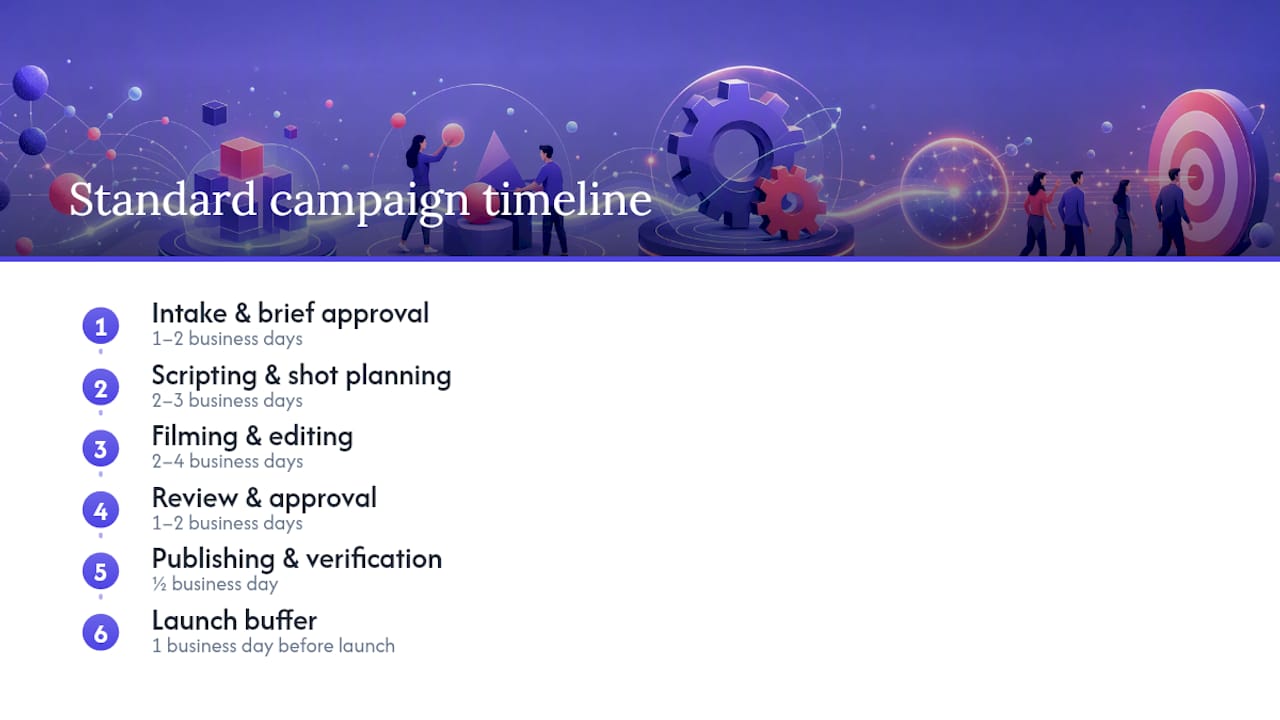
Build in a buffer day before launch, not after. Teams that schedule launch immediately after the last approval round have zero room for a rendering error or a last-minute compliance flag. A single buffer day absorbs that risk without pushing the actual go-live date.
Deadlines only work if they're visible to everyone touching the project, not just the person who set them. A shared timeline that shows which phase an asset is currently in, and how many days remain before its deadline, keeps a stalled review from quietly eating into the launch buffer without anyone noticing until it's too late.
What Else Reduces Ad Fatigue Beyond Producing More Creative?
Producing more variants is the foundation, but volume alone doesn't fully solve fatigue if every variant runs to the same audience at the same time. Rotation and segmentation do work that raw output can't.
Structured creative rotation means scheduling which variant runs when, rather than launching everything simultaneously and letting the algorithm sort it out. Staggering new creative into an ad set every few days, instead of dumping ten variants in at once, keeps a reserve of fresh assets ready when frequency starts climbing on the current batch.
Audience segmentation multiplies the effective lifespan of a smaller creative pool. The same three ad concepts shown to five distinct audience segments face far less frequency pressure per segment than the same three ads shown to one broad audience. Splitting cold prospecting, warm retargeting, and lookalike audiences into separate ad sets, each with creative tuned to that audience's familiarity with the brand, means fatigue builds at a different pace in each segment instead of hitting all your spend at once.
Exclusion targeting closes the loop. Once someone has converted, or has seen the same ad more than a set number of times without engaging, excluding them from that ad set frees up impressions for the audience still likely to respond. Combined with a rotation schedule and clear retirement rules, this stretches a given batch of creative considerably further than production speed alone ever could.
How Should Teams Communicate During the Creative Process?
Most workflow breakdowns trace back to information sitting in the wrong place, not to a lack of effort from anyone involved. A creator who doesn't know a client changed the offer yesterday will still produce yesterday's ad today.
Centralize status and feedback in one system rather than splitting communication across email, Slack, and verbal check-ins. When feedback lives in three different places, someone inevitably works from an outdated version because they never saw the update that landed somewhere else. A single source of truth for status, comments matters more than which specific tool holds it.
Set a standing cadence for updates instead of relying on ad hoc pings. A short daily or twice-weekly check on what's in production, what's stuck in review, and what's launching next keeps small blockers from turning into missed deadlines. This doesn't need to be a long meeting. Ten minutes covering only what's stalled is usually enough.
Make sure feedback is specific and actionable at the point it's given, not vague. "Change the hook" sends a creator guessing. "The hook doesn't state the offer until second four, move it to second one" gives them something to act on immediately. This single habit, more than any tool, is what actually cuts review rounds down.
How Do You Define Roles on a Creative Team?
Ambiguity about who owns a decision is the quiet killer of workflow speed. When two people both think they're responsible for final sign-off, or nobody thinks they are, an asset stalls in limbo.
Define four core functions clearly, even on a small team where one person wears multiple hats: strategist (sets the brief and objective), creator (produces the asset), reviewer (checks quality and compliance), and approver (owns the final go or no-go decision). On a lean team, the same person might fill two of these roles, but never should the creator and approver be the same person on a given asset. That overlap is where blind spots creep in.
Document who owns escalation when a decision stalls. If a reviewer hasn't responded within the agreed window, who has authority to approve in their place? Without an answer to that question written down somewhere, the default becomes waiting, and waiting is where deadlines slip.
Revisit role assignments as the team scales. A workflow that worked with two people handling everything informally usually breaks once a team hits five or six, because the informal understanding of "who does what" stops being obvious to new hires. Writing the roles down, even in a simple shared document, prevents that breakdown before it costs a launch date.
The One Workflow Change Most Teams Skip
Most performance teams already know they need better briefs and faster reviews. Where they fall short is treating the brief as a one-time form instead of the single source of truth the entire workflow runs on. Every downstream delay—an editor guessing at tone, a reviewer requesting a change that contradicts the original ask—traces back to a brief that wasn't specific enough or wasn't enforced as mandatory before work started.
The governance fix is small but it has to come from leadership, not from the production team. Make the brief gate non-negotiable: no incomplete brief enters the queue, no exceptions for a "quick one" from a senior stakeholder. One mid-size e-commerce team I've seen described in workflow case studies cut their average brief-to-launch time significantly simply by refusing to let ungated requests into production, combined with batching multi-format exports instead of producing them one at a time.
That single governance change, enforced consistently, does more for speed than any new tool purchase.
— James
A Faster Way to Turn One Video Into a Week of Ads
If your bottleneck isn't strategy, it's hands on the timeline, that's a production capacity problem, not a planning problem. A managed VA workflow can address exactly that gap: send one raw video, and a dedicated virtual assistant turns it into multiple ad variants, different hooks, formats, and cuts, within 24 to 48 hours instead of the days a traditional editing process usually takes.
That turnaround keeps fresh creative entering rotation on the weekly cadence performance actually requires, which is the mechanism behind the 31% average drop in CPA teams see once fatigue stops eating into their existing ad sets. It also frees you from spending your week specifying crops and cutdowns so you can spend it on audience segmentation and testing strategy instead. If your current pipeline can't keep pace with the rotation schedule this article laid out, check the ad fatigue diagnostic and workflow details and see whether a managed batch fits your next campaign cycle.
Sources
- Creative workflow management: Steps & software - Airtable
- Creative Workflow Overview | Wonderful Documentation | Wonderful
- Creative Workflow Management: Tools, Tips & Processes - PageProof
FAQ
What Are the Main Phases of a Paid Social Creative Workflow?
The core phases are intake and briefing, production, review and approval, publishing, and performance-based iteration, each with its own owners and deadlines.
How Many Ad Formats Should One Concept Produce?
Plan for at least three aspect ratios per concept, 1:1, 9:16, and 16:9, since most paid social placements across Meta, TikTok, and LinkedIn require different crops of the same idea.
How Often Should Creative Be Refreshed to Avoid Fatigue?
Introducing two to four new variants per active ad set every one to two weeks keeps most accounts ahead of the frequency climb that signals fatigue.
Can a Managed Service Replace an In-House Creative Team?
A managed VA service like Jamesyee typically supplements in-house strategy and audience work by handling the repetitive multi-format production step, not by replacing strategic decision-making.
What's the Fastest Way to Cut Approval Delays?
Assign distinct creator, reviewer, and approver roles, use threaded, timestamped feedback instead of vague comments, and cap review at two rounds by fixing incomplete briefs before they ever start.