

The best LinkedIn outreach strategy in 2026 pairs a tight ICP with two to five days of pre-engagement, a connection note under 300 characters, and a first DM sent 24 to 48 hours after acceptance, followed by value-first follow-ups. Aim for a 30 to 45% acceptance rate, a 10 to 20% reply rate, and a 15 to 25% reply-to-meeting conversion. The checklist below breaks down every piece so you can audit or build your own program today.
TL;DR:
- Filtering prospects with behavioral signals such as recent job changes, active posting, or funding events significantly improves reply and meeting conversion rates.
- Engaging with a prospect's content for two to five days before connecting increases acceptance more than relying on crafted connection notes alone.
- Sending a personalized connection note under 300 characters that mentions a specific and genuine reason can boost acceptance and response rates.
- Waiting 24 to 48 hours after acceptance before sending the first value-focused DM helps protect reply rates and account health.
- Maintaining fresh ad creative and varying outreach content reduces fatigue and supports long-term campaign effectiveness.
Table of Contents
- What Are the Core Pillars of a LinkedIn Outreach Strategy?
- How Do You Run a LinkedIn Outreach Sequence Step by Step?
- What Messaging Templates and Copy Rules Actually Work?
- How Do You Build a High-Signal Prospect List?
- How Do You Scale LinkedIn Outreach Without Risking Restrictions?
- What KPIs Should You Track for LinkedIn Outreach?
- What Ethical Standards Should Guide LinkedIn Outreach in 2026?
- Why Creative Velocity Matters as Much as the Message Itself
- What I've Learned Running LinkedIn Outreach Programs
- How Jamesyee Keeps Your Outreach Campaigns Fresh
- Sources
What Are the Core Pillars of a LinkedIn Outreach Strategy?
Five elements separate outreach programs that book meetings from ones that get ignored, or worse, reported. Miss any one of them and the whole sequence underperforms, no matter how clever the copy is.
ICP and signal layer. Define who you're targeting by firmographic data (industry, headcount, seniority), then layer in behavioral signals that indicate timing: someone commenting on a competitor's post, a company that just closed a funding round, a new VP who started 60 days ago. A prospect who fits your ICP on paper but shows zero warm signal is a cold contact wearing a warm disguise.
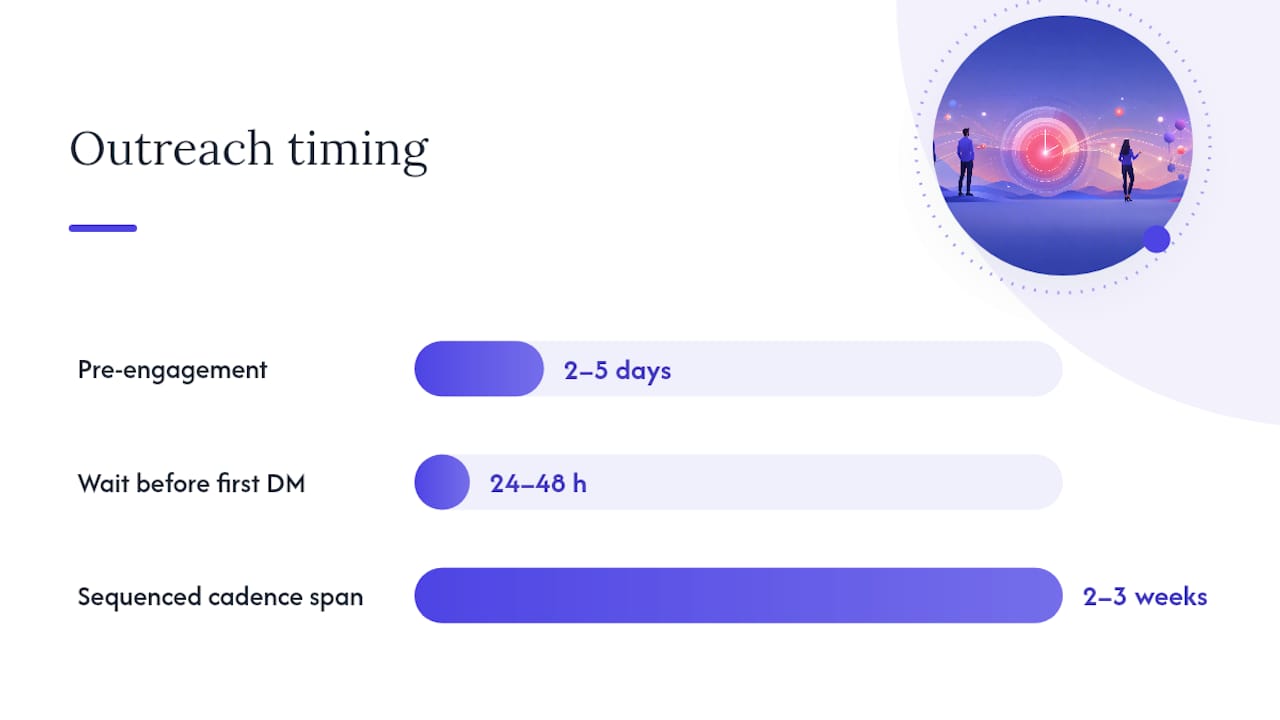
Pre-engagement before you ever hit connect. Viewing a profile, liking a recent post, and leaving one genuine comment in the days before you send a request builds name recognition. It often does more for acceptance rates than a perfectly worded note, because the prospect has already seen your name once or twice before your request lands.
Connection note discipline. Keep it under 300 characters, name one specific and real reason you want to connect, and never pitch anything in that note. Templates that skip the specific reason blend into the noise every LinkedIn user scrolls past daily, according to Lead Scorer's 2026 analysis.
Sequenced, value-first cadence. Your first DM should not ask for a meeting. It should ask a question or offer something useful, with follow-ups spaced across two to three weeks that keep giving before they ask.
Account safety and measurement. Every message you send either protects your account's long-term sending capacity or spends it down. Track acceptance, reply, and conversion rates weekly, and treat any account restriction as new data, not a fluke.
Here's the checklist version for a quick self-audit:
- Does your list filter on behavioral signals, not just job title and headcount?
- Do you engage with a prospect's content for two to five days before connecting?
- Is your connection note under 300 characters with one specific reason?
- Does your first DM wait 24 to 48 hours and lead with value, not an ask?
- Are you tracking acceptance, reply, and meeting-conversion rates by account?
How Do You Run a LinkedIn Outreach Sequence Step by Step?
This is the day-by-day version you can copy directly into whatever outreach tool or spreadsheet you run today.
Day 1 to day 3 (or day 5 for higher-value targets): pre-engagement. Visit the prospect's profile. View at least one recent post. If something they wrote is genuinely relevant to your work, leave a comment that adds a point or asks a real question, not "Great post!" This step matters more than most outreach guides admit: showing up in someone's notifications before you ask to connect makes your name familiar rather than foreign, which tends to lift acceptance more than a clever note ever will.
- Identify 2 to 3 pieces of recent activity (a post, a comment, a job change, a company announcement) you can reference honestly.
- Engage once or twice, spaced a day or two apart, never all at once in a five-minute burst that reads as automated.
- Log the specific detail you'll use in your connection note so you don't send a generic one later out of laziness.
Day 3 to day 5: send the connection request. The note stays under 300 characters and names the one real reason you're reaching out. Something like referencing their recent post, a shared connection, or a specific role change works better than "I'd love to add you to my network," which says nothing.
Example structure: "Hi [Name], your post on [specific topic] matched something I've been working through with [specific context]. Would love to connect and swap notes."
That's roughly 140 characters, well under the ceiling, and it names a real, checkable reason.
Day 6 to day 7 (24 to 48 hours after acceptance): send the first DM. Do not open with a pitch. Open with a question tied to the reason you connected, or offer a resource with no strings attached. Waiting a day or two after acceptance, rather than firing off a DM the second someone accepts, reduces the appearance of automation and tends to protect both your reply rate and your account standing.
- Send DM 1 within 24 to 48 hours of acceptance: a short question or a useful resource, one clear ask, nothing longer than a few sentences.
- Wait for a response for at least 3 days before any follow-up. Patience here separates outreach from spam.
Day 10 (roughly day 3 after DM 1): follow-up one. If there's no reply, add value rather than nudge. Share a relevant article, a quick insight, or reference something new they posted. Never write "just following up" with nothing new attached.
Day 14: follow-up two. This is where you can introduce a light, specific ask, such as a 15-minute call framed around a concrete problem you think you can help solve. Keep it short.
- Send follow-up 2 around day 14 with one specific, low-friction ask.
Day 21 (roughly day 7 after that): follow-up three, and the graceful exit. If you've had no response across three touches, this is your last message in the sequence. Keep it light: "I don't want to clutter your inbox. If this isn't relevant right now, no worries at all. Feel free to reach out whenever the timing works better." That line alone often gets a reply, because it removes pressure entirely.
- Send the exit message and then move the contact to a long-term nurture list rather than deleting the relationship.
Three to four value-driven follow-ups spread across two to four weeks is the practical ceiling for most campaigns, according to DealsFlow's 2026 B2B playbook. Push past that and response rates drop while the risk of a spam report climbs.
What Messaging Templates and Copy Rules Actually Work?
Copy is where most outreach dies, not because people write badly, but because they write generically. The fix isn't more creativity. It's discipline around length, structure, and specificity.
Invite-note template: "Hi [Name], saw your comment on [specific topic/post] and it lines up with something I'm working on around [specific area]. Would love to connect."
Swap the bracketed details for something true and checkable. A note that could apply to 500 other people gets ignored by all 500.
First-DM template, question-first: "Thanks for connecting, [Name]. Curious how your team is handling [specific challenge tied to their role/industry] right now. Anything working well?"
First-DM template, resource-first: "Thanks for connecting, [Name]. Came across [resource/article/data point] and thought it might be useful given your work on [specific area]. No agenda, just thought it was relevant."
Both formats avoid the two things that kill reply rates fastest: a visible pitch in message one, and an obvious merge-tag error that screams "template."
Nine rules worth following on every message you send:
- Keep messages under 400 characters whenever possible.
- Never leave a visible merge-tag gap or generic placeholder.
- Lead with a question or a piece of value, not your product.
- Reference something specific and real, never a vague compliment.
- End with an easy next step, not an open-ended "let me know your thoughts."
- Write at a conversational register, not a marketing register.
- One goal per message. Don't stack a question and a pitch in the same DM.
- Match message length to relationship stage: shorter early, more detail once there's a reply.
- Test voice notes or a 30-second video for warm leads with no reply after two touches.
Pro Tip: Run an A/B test on your first DM by sending 20 question-first openers against 20 resource-first openers to the same ICP segment, then track which format gets more second replies, not just first replies. First replies are easy. Second replies tell you if the conversation actually has legs.
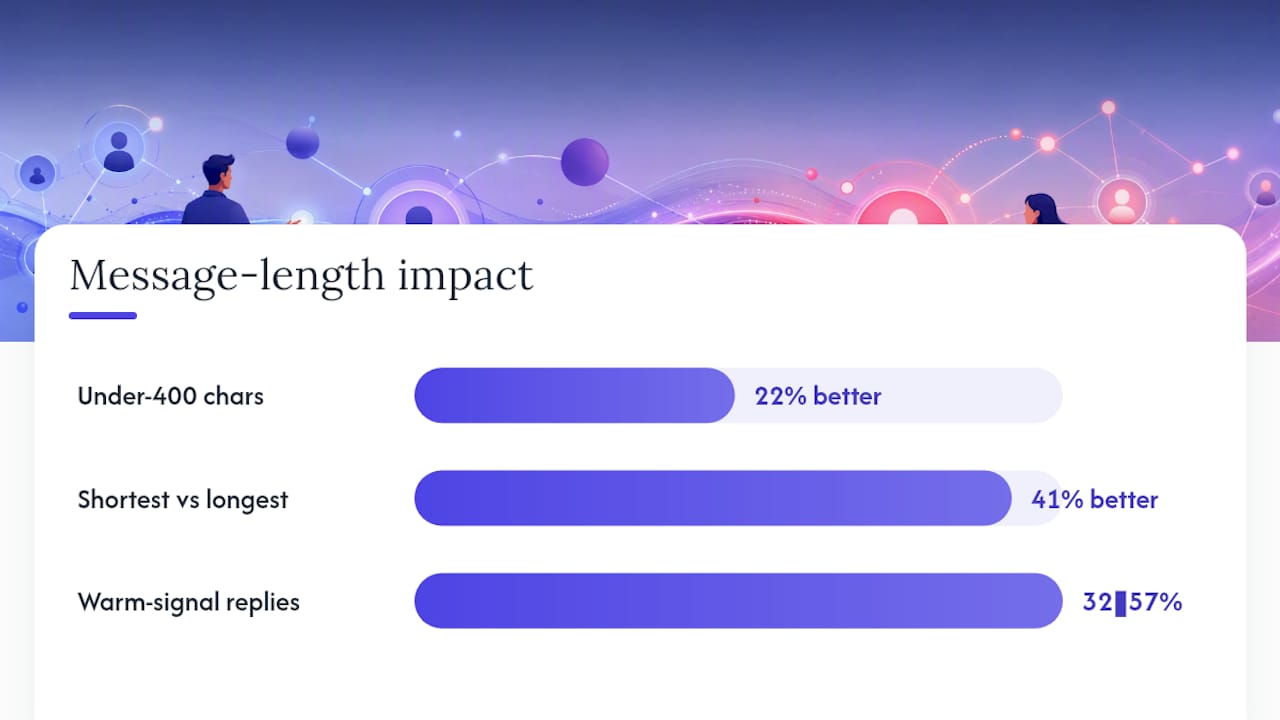
Message length is not a stylistic preference; it's a measurable lever. A synthesis of 47 studies on LinkedIn messages that get responses found messages under 400 characters produced 22% better response rates than longer ones, and the shortest messages outperformed the longest by 41%. Applying ReactIn's copywriting rules, including question-first openers and single-goal messages, pushed warm signal-based campaigns to reply rates between 32% and 57% in their testing.
How Do You Build a High-Signal Prospect List?
Job title and headcount filters get you a list. Behavioral signals get you a list that actually replies.
Start with the standard ICP fields: industry, company size, seniority level, and function. Sales Navigator handles this well on its own. The gap most teams miss is layering behavioral data on top: who's posting about a relevant pain point, whose company just announced a funding round, who got hired into a new role in the last 60 to 90 days. A VP of Marketing who just joined a company is actively evaluating vendors and tools; the same VP who's been in the role three years is not shopping.
Practical filter combinations to try in Sales Navigator:
- Recent job change (0 to 90 days) + seniority director and above — new hires reassess vendor relationships early.
- Posted on LinkedIn in the last 30 days + industry match — active posters are easier to warm up with a genuine comment.
- Company headcount growth + funding event in the last 6 months — growth signals budget and urgency.
- Group membership or event attendance overlap — shared context gives you a real reason for your connection note.
Score each prospect on a simple scale: two points for a firmographic match, one point for each behavioral signal present. Prioritize outreach toward the highest scores first, since your daily volume is limited by account safety caps anyway.
The payoff for this extra filtering step is real. Teams that build lists around engagement, hiring, and funding signals rather than job-title filters alone concentrate their reply volume into fewer, higher-quality conversations, according to DealsFlow's analysis of B2B outreach performance. A shorter list of warm prospects consistently outperforms a longer list of cold ones, because every touch in your sequence lands on someone who already has a reason to respond.
How Do You Scale LinkedIn Outreach Without Risking Restrictions?
Volume kills more outreach programs than bad copy does. LinkedIn's automated detection watches for patterns: identical send times, near-instant connect-then-message behavior, and invite volume that spikes out of nowhere on a new account.
Warmup schedule for new or dormant accounts:
- Week 1: Manual activity only. Accept a few connections, comment on 3 to 5 posts a day, no outbound invites yet.
- Week 2: Start sending 10 to 15 invites a day, still manual, still mixed with genuine engagement.
- Week 3: Ramp to 20 to 30 invites a day if acceptance rate holds above 30%.
- Week 4 and beyond: Move toward standard daily caps, introducing light automation only after the account shows a consistent pattern.
Warmed accounts can typically handle up to 80 invites a day, though this depends heavily on account age and standing, according to Overloop's outreach playbook.
For teams running outreach across multiple accounts, orchestration matters as much as any single account's cap. Stagger send times with randomized intervals rather than firing every account's messages on the same schedule. Route a human review step before any bulk send goes out, especially when AI tools draft the initial message. Automation hygiene here isn't optional bureaucracy. It's the difference between a program that runs for years and one that gets an account flagged in month two.
Pro Tip: Never launch a new automation tool on your highest-value account first. Test any new sequence, cadence, or AI personalization layer on a lower-priority account for two weeks before rolling it out where it actually matters.
What KPIs Should You Track for LinkedIn Outreach?
Four numbers tell you almost everything about whether your outreach program is working: acceptance rate, reply rate, reply-to-meeting conversion, and meetings booked per account per month.
| Metric | Healthy target | Warning sign |
|---|---|---|
| Acceptance rate | 30% to 45% | Below 20% |
| Reply rate | 10% to 20% | Below 5% |
| Reply to meeting conversion | 15% to 25% | Below 10% |
| Meetings per account per month | 10 to 15 | Below 4 |
These benchmarks come from DealsFlow's 2026 B2B outreach playbook, and they're a reasonable diagnostic starting point rather than a universal guarantee.
Use the pattern of where the funnel breaks down to figure out what to fix. Low acceptance with decent reply rates on the messages that do land points to a targeting problem, meaning your list needs more behavioral filtering, not better copy. Good acceptance but weak replies points to a copy problem: your connection notes are working, but your first DM isn't earning a response. Good acceptance and good replies but few meetings booked usually means your follow-up cadence is too aggressive or your ask arrives too early.
A simple weekly dashboard covering these four numbers per account, reviewed against last week's numbers, catches problems before they become a pattern across your whole outreach volume. Tools built for measuring outreach-to-inbox conversion, like theNeedle, can help surface where messages are landing and whether replies are converting into real conversations rather than just clicks.
What Ethical Standards Should Guide LinkedIn Outreach in 2026?
The line between effective outreach and a spam report is thinner than most people think, and it's usually about respect, not tactics.
Never reveal how you tracked someone's activity in your message. Referencing that someone "viewed your profile 6 times" or citing tracking data most people don't know exists feels invasive rather than flattering. Reference public content only: a post, a comment, a job change anyone could see.
Apply a version of the 5-3-2 content logic to your outreach cadence: the large majority of your touches should offer something useful with no ask attached, a smaller portion should share relevant perspective or resources, and only a small fraction should attempt to move the relationship toward a meeting or sale. Sequences that front-load the ask get reported. Sequences that front-load value get replies.
What triggers a spam report, in practice:
- Pitching in the connection note before you're even connected.
- Sending a DM within minutes of acceptance.
- Identical, obviously templated messages with no specific detail.
- Following up more than four times with no new value in any of them.
- Referencing tracking data the prospect never agreed to share.
Respect for privacy and pacing isn't a compliance checkbox. It's what keeps your reply rates high and your account in good standing long after competitors running aggressive volume get flagged.
Why Creative Velocity Matters as Much as the Message Itself
Most outreach breakdowns aren't about the DM at all. They're about what happens after a prospect clicks through to see if the company behind the message is actually worth their time.
A multi-touch outreach program depends on more than good copy. It depends on the ads, landing pages, and content a prospect sees when they check you out mid-sequence, and that content needs to stay fresh across weeks of follow-ups. Some companies have built models around exactly this problem: turning one raw video into multiple ad variations quickly, so campaigns supporting outreach never run on stale creative. Clients using this model have reported a 31% reduction in cost per acquisition, tied directly to keeping ad content varied instead of running the same three creatives until they burn out.
Outreach and paid creative aren't separate workstreams when a prospect is deciding whether to reply. They're the same trust signal, seen from two different angles, and both need the same level of attention to stay convincing across a three-week sequence.
What I've Learned Running LinkedIn Outreach Programs
The biggest myth in outreach is that the connection note is the whole game. It isn't. Pre-engagement and first-DM timing do more heavy lifting than most guides admit, because acceptance without prior recognition is a coin flip, while acceptance after a genuine comment or two feels earned rather than requested.
The one operational tweak that outperforms almost everything else: waiting the full 24 to 48 hours before sending the first DM. Teams that skip this step to move faster consistently see lower reply rates and more account flags because instant messaging after acceptance is the clearest automation signal LinkedIn's systems watch for.
The caution worth repeating: automation should compress the busywork, not replace judgment. The moment a sequence runs entirely on autopilot with no human reviewing tone or timing, it starts reading like what it is.
— James
How Jamesyee Keeps Your Outreach Campaigns Fresh
A LinkedIn outreach sequence only works if the brand behind it looks alive when a prospect checks it out mid-conversation, and that means your ad creative can't go stale while your DMs are still running. A managed service provides an alternative to hiring a full creative agency or doing editing yourself: dedicated virtual assistants turn one raw video into multiple ad variations within about two days, so campaigns on platforms like TikTok, Meta, and LinkedIn stay in sync with an active outreach cadence instead of lagging behind it.
If your team needs creative that doesn't go stale mid-sequence while you focus on the messaging side, check the current turnaround options and see what a managed VA workflow looks like for your ad volume.
Sources
The DealsFlow B2B playbook is the strongest single source for funnel benchmarks: acceptance, reply, and meeting-conversion targets that hold up across most B2B contexts. Overloop's outreach guide covers warmup schedules and daily caps in more operational detail than most platforms publish. ReactIn's copywriting rules and The Interview Guys' message-response research both back the length and structure guidance used throughout this playbook. For measurement, theNeedle helps track whether replies convert into real conversations, not just opens.
- We analyzed 47 studies about LinkedIn messages that get responses — The Interview Guys
- LinkedIn Connection Request Messages in 2026: What Gets Accepted (and Replied To) — Lead Scorer
- LinkedIn Outreach Strategy: The Complete B2B Playbook for 2026 — DealsFlow
- LinkedIn Outreach: The Guide for B2B Sales — Overloop
- 9 LinkedIn DM copywriting rules for 32-57% reply rates — ReactIn