

Yes, LinkedIn enforces connection limits, but not through a single published number. It throttles accounts based on behavior patterns, and the platform's own help pages never list one universal weekly cap. If you're seeing warning messages right now, stop sending invites immediately. Withdraw anything that's been pending for more than two to four weeks, since a bloated queue is one of the clearest signals LinkedIn associates with spam accounts.
If you need a safe number to work from today, use this as your emergency baseline:
- Cut back to 10 to 20 connection requests per day until warnings stop appearing.
- Withdraw pending invites older than two to four weeks rather than letting them pile up.
- Scale up slowly over several weeks instead of jumping back to your old volume.
- Mix in profile views and content engagement so your activity doesn't look like pure outreach.
Key Takeaways
LinkedIn throttles connection activity based on account behavior and history rather than a single fixed number, so safety comes from pacing and acceptance rate, not from memorizing one magic figure.
| Point | Details |
|---|---|
| No official weekly cap exists | LinkedIn enforces behavior-based throttles instead of one published numeric limit. |
| Safe daily range for invites | Community guides suggest 10 to 20 per day, roughly 100 per rolling week for most accounts. |
| InMail credits are documented | Sales Navigator Core offers 50 monthly credits; Premium Business offers 15. |
| Withdraw stale pending invites | Remove anything pending two to four weeks to reduce spam signals and improve capacity. |
| Restrictions usually clear fast | Most first-time blocks last 24 to 72 hours and resolve within about a week. |
| Creative capacity limits outreach scale | Jamesyee's Wing Assistant produces fresh ad variations in 24 to 48 hours to support teams scaling campaigns alongside outreach. |
Table of Contents
- Understanding the LinkedIn Weekly Invite Limit and How Enforcement Works
- Safe Ranges for Invites, Messages, and Pending Requests
- Spotting Risk Signals Before LinkedIn Restricts Your Account
- How to Audit and Clean Up Pending Connection Requests
- Growing Your Network Without Tripping LinkedIn's Limits
- Sources
Understanding the LinkedIn Weekly Invite Limit and How Enforcement Works
LinkedIn has never published a fixed weekly invitation cap, and that's the detail most outreach guides get wrong. What actually exists is a rolling 7-day evaluation window that flags accounts sending invites faster than their history supports. Enforcement is behavior and pattern based, not a hard cutoff tied to a specific day of the week.
A handful of things genuinely are documented. LinkedIn's total connection cap sits at 30,000, and Sales Navigator's InMail credit allotments are published outright. Everything about invitation volume, on the other hand, comes from account signals LinkedIn weighs together:
- Account age. A brand-new profile gets throttled far sooner than a five-year-old one with steady activity.
- Acceptance rate. Sending 50 invites and getting 3 accepted reads as spam behavior, even if the volume seems modest.
- Subscription tier. Premium and Sales Navigator accounts generally tolerate higher outreach volume, though neither removes the underlying throttle.
- Social Selling Index and baseline activity. Accounts with consistent posting, commenting, and profile engagement earn more room before triggering a warning.
Statistic to know: community and tool guides converge on roughly 100 invites per rolling week as the point where risk starts climbing for a typical account, though that number shifts based on the signals above.
Safe Ranges for Invites, Messages, and Pending Requests
Treat every number below as an operating range, not a guarantee. Two accounts sending an identical 80 invites in a week can get wildly different outcomes depending on acceptance rate and account age.
| Activity | Commonly reported safe range | Notes |
|---|---|---|
| Connection invites (free account) | a daily range of a few dozen per day, with a commonly cited weekly range around 100 on a rolling week | Ceiling drops fast if acceptance rate is low |
| Connection invites (Sales Navigator, strong signals) | 100 per week | Higher tolerance, not immunity from throttling |
| InMail credits, Sales Navigator Core | 50 per month | Officially published by LinkedIn |
| InMail credits, Premium Business | 15 per month | Officially published, unused credits may roll over |
| Pending invites outstanding | Keep well under several hundred, as large queues are widely reported spam signals | Large queues are a widely reported spam signal |
| Profile views per day | A community-reported range varying heavily by account type and history | Varies heavily by account type and history |
InMail credits are the one area LinkedIn documents with real precision, which is why they're worth naming as a fixed reference point in an otherwise fuzzy system. Pending invites are the opposite case: nobody at LinkedIn has published an exact ceiling, but practitioners consistently report that queues stretching into the hundreds correlate with reduced sending capacity. Keeping that queue short isn't just tidy account hygiene. It appears to directly protect your ability to send new requests at all.
Spotting Risk Signals Before LinkedIn Restricts Your Account
LinkedIn rarely restricts an account out of nowhere. A few patterns show up again and again before a warning lands:
- A sudden volume spike. Jumping from 15 invites a day to 80 overnight reads as automated behavior even if a human is doing the clicking.
- A falling acceptance rate. Once accepted invites drop below roughly 20%, LinkedIn's systems treat continued volume as a red flag.
- Automation fingerprints. Identical send times, identical message templates, or third-party tool signatures all raise scrutiny.
- An oversized pending queue. Hundreds of unanswered invites sitting stale is one of the most consistently cited triggers.
- Unusual login activity. New devices, new locations, or rapid-fire sessions can trigger security checks that compound with outreach flags.
When LinkedIn does act, it typically escalates in stages: a soft warning banner first, then a CAPTCHA or identity verification prompt, then a temporary sending block that commonly lasts 24 to 72 hours. Repeat offenses stretch that window and can trigger longer holds.
Recovery is straightforward if you act early. Pause the flagged action completely, withdraw invites that have gone stale, and spend a few days on organic activity, comments, posts, profile visits, before sending anything new. Most first-time restrictions clear within about a week once the account returns to normal-looking behavior.
Pro Tip: Don't just wait out a restriction passively. Use the downtime to comment on five to ten posts in your target industry. It signals genuine activity and often speeds up how fast normal sending capacity returns.
How to Audit and Clean Up Pending Connection Requests
A cluttered pending list is one of the easiest problems to fix, and it takes less time than most people assume.
- Open your Sent invitations list under "My Network" and sort by date to spot anything older than two to four weeks.
- Withdraw every stale invite in that batch. Doing this both shrinks your queue and signals better targeting to LinkedIn's systems.
- Wait several weeks before re-sending to the same person, and change the message. A generic template that got ignored once rarely performs better the second time unedited.
- Set a recurring calendar reminder, monthly works for most people, to repeat this audit before the queue grows large again.
This single habit prevents the most common reason accounts get throttled without ever running automation software.
Growing Your Network Without Tripping LinkedIn's Limits
The safest path to network growth isn't clever workarounds. It's pacing.
- Build your first 300 or so connections manually before introducing any tool-assisted outreach, so LinkedIn's systems have a normal baseline to compare against.
- Increase volume by roughly one step per week rather than jumping straight to your target number.
- Track your acceptance rate weekly. Anything above 20% suggests your targeting and messaging are working; below that, fix the message or the list before adding volume.
- Combine invites with profile visits and comments on target prospects' posts. A mixed activity pattern looks nothing like the invite-only spam pattern LinkedIn's systems are trained to catch.
- Pull back the moment acceptance rates drop, rather than pushing through and hoping the trend reverses.
Pro Tip: Warm up a connection before inviting them. Viewing a profile or leaving a thoughtful comment 24 hours before sending a request measurably improves acceptance rates, and it costs you nothing but a few minutes.
What actually separates safe outreach from risky outreach
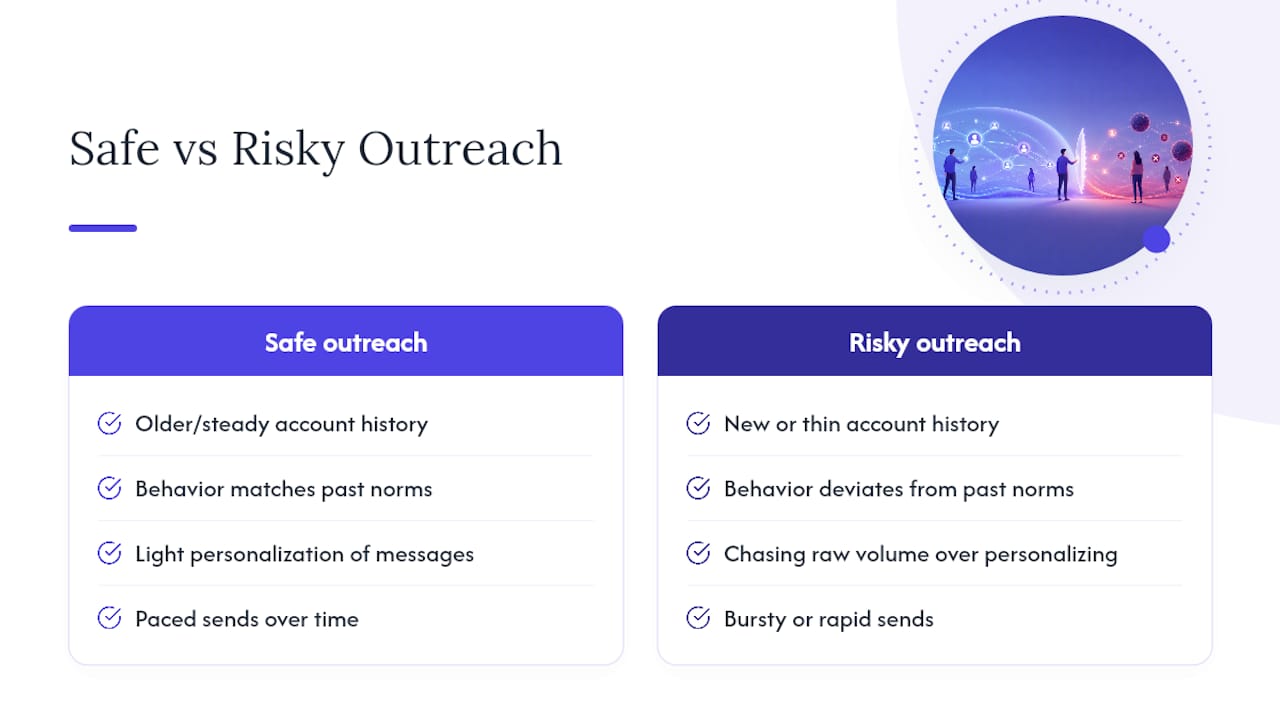
Most advice on this topic treats connection limits like a puzzle to solve, find the magic number, and you're set. That framing is backward. LinkedIn isn't counting your invites against a scoreboard; it's comparing your current behavior against your own account's history. A five-year account with steady engagement can often send more than a guide's stated "safe range" without issue, while a brand-new profile can get flagged well under it.
The pattern I keep seeing in outreach data is that acceptance rate matters more than volume. Teams that personalize even lightly and pace their sends tend to avoid restrictions almost entirely, while teams chasing raw numbers get throttled regardless of how conservative their daily count looks on paper. If your team is scaling outreach and struggling to keep messaging fresh enough to maintain that acceptance rate, the bottleneck is usually creative capacity, not strategy, which is where managed production workflows earn their keep.
— James
A Faster Way to Keep Your Outreach Campaigns Fresh
If your LinkedIn outreach is scaling but your ad creative can't keep pace, that's a production problem, not a strategy problem. Jamesyee's Wing Assistant turns a single raw video into multiple fresh ad variations in 24 to 48 hours, using dedicated virtual assistants instead of a slow agency retainer.
If creative output is what's slowing down your outreach machine, not messaging or pacing, that's the moment to bring in support built specifically for volume. Check out Wing Assistant's ad creative service and see how a 24 to 48 hour turnaround fits into your current campaign cycle.
Sources
- Do LinkedIn connection request limits actually exist, or is that a myth?
- LinkedIn Limits 2026: Connection, Message & Search Caps
- LinkedIn Automation Safety Guide: How to Avoid Account Restrictions in 2026