
The best cold message on LinkedIn does one thing well: it names a specific, recent signal about the person and asks a single question that takes ten seconds to answer. Skip the pitch entirely on the first touch. That single shift, anchoring the message to something real instead of opening with an offer, is what separates messages that get replies from the ones that get archived.
TL;DR:
- Focus on referencing a specific recent activity or signal by the prospect to create a relevant and genuine anchor for your message.
- Keep the ask minimal and relevant, avoiding pitches or requests for meetings in the first message, and instead pose a low-friction question tied to the anchor.
- Use a three-part message structure: establish the anchor, connect it with a brief bridge, and then make a single, simple ask to improve reply rates.
- Limit connection requests to under 300 characters, follow-up messages to 75-150 words, and prioritize quality over volume for better engagement.
- Personalize signals quickly by checking recent posts, comments, or profile updates within 90 seconds to ensure relevance without extensive research.
Table of Contents
- Three LinkedIn Cold Message Templates You Can Send Today
- What Every High-Reply Message Has: Anchor, Bridge, Ask
- Connection Request, First DM, or InMail: Which One to Send
- How Many Follow-Ups Should You Send, and When?
- Where to Find Personalization Signals in 90 Seconds or Less
- Should You Use Voice Notes or Video in Cold Outreach?
- More Fill-in-the-Blank LinkedIn Message Templates by Scenario
- What Most People Get Wrong About Cold LinkedIn Outreach
- Sources
Three LinkedIn Cold Message Templates You Can Send Today
You don't need a swipe file of fifty templates. You need three that match the three situations most professionals actually face: landing a job, building a relationship, or opening a B2B conversation. Each one below fits comfortably inside LinkedIn's practical length limits, and each is built to work as either a connection request note or a first DM.
-
Job outreach (connection request, under 280 characters): "Hi [Name], saw your post about [specific project/team]. I'm exploring roles in [field] and would love a 10-minute perspective on how your team approaches it. Open to connecting?" This works because it references something concrete, not a generic "I'd love to connect."
-
Networking/advice (first DM, 75 to 100 words): "Hi [Name], I noticed you moved into [new role] last month, congrats. I'm working on something similar in [area] and your background in [specific detail] caught my eye. Would you be open to a quick question about how you navigated [specific challenge]? No ask beyond that, just trying to learn from someone further along." This template leans on a job-change trigger, which is one of the easiest signals to spot and act on quickly.
-
B2B intro (InMail or first DM, 90 to 130 words): "Hi [Name], congrats on the [funding round/product launch/hire] announcement. Companies at that stage usually hit [specific pain point] around scaling [X]. Curious how your team is handling it right now. If it's relevant, happy to share how we've approached it elsewhere. Worth a short chat?"
For follow-ups, keep the variation small: swap the question, not the whole message. If template one gets no response after five days, try "Still exploring [field]. Curious if you've seen movement in [specific trend] lately?" That one-line pivot often outperforms a full rewrite because it signals you're paying attention, not running a script.
What Every High-Reply Message Has: Anchor, Bridge, Ask
Every message that performs well breaks into three parts, and skipping any one of them is usually why a message flops.
The anchor is the specific, recent trigger, something you can point to and say "this is why I'm messaging you now." A vague anchor ("I saw your profile") does nothing. A real anchor looks like: "You posted last week about switching your team from outbound calling to LinkedIn sequences" or "Saw you moved from [Company A] to Head of Growth at [Company B] two weeks ago."

The bridge connects that anchor to why it matters to the conversation you want to have. It's one sentence, not a paragraph: "That kind of transition usually means rethinking how the team measures pipeline quality."
The ask is a single, low-friction question, not a meeting request and never a pitch. "Curious what changed your mind on that?" beats "Can we hop on a 30-minute call?" every time on a first touch.
Two quick conversions to show how this works in practice:
- Profile signal: "Posted about hiring 3 SDRs this quarter" → Anchor: "Saw the SDR hiring push." Bridge: "That usually means ramp time becomes the bottleneck." Ask: "What's been the trickiest part of getting new reps productive fast?"
- Profile signal: "Commented on a post about creative fatigue in paid social" → Anchor: "Saw your comment on the ad fatigue thread." Bridge: "That's a problem a lot of performance teams hit around the same growth stage." Ask: "Is that something you're actively trying to solve right now, or more of a background concern?"
Pro Tip: Never include a calendar link, pricing, or a pitch deck in the first message. The moment a cold message asks for a meeting before establishing any real exchange, reply rates drop off fast. Save the ask for a link until the third or fourth touch, if at all.
Avoid these two mistakes above everything else: opening with your own credentials instead of their signal, and asking two questions when one would do.
Connection Request, First DM, or InMail: Which One to Send
Picking the right surface matters as much as what you write on it. A connection request note that reads like an InMail pitch gets ignored, and an InMail written like a text message wastes a credit.
Keep connection notes under 200 to 300 characters, since LinkedIn's preview truncates anything longer and mobile readers rarely tap to expand. First DMs after a connection accepts should run 75 to 150 words. Follow-ups should stay tighter, 40 to 75 words, because by that point you're reinforcing, not introducing.
| Surface | Length target | Best for | Typical reply range |
|---|---|---|---|
| Connection request note | Under 200-300 characters | Warming up a stranger before messaging | Noted requests reply at 8.2% vs. 5.3% for blank requests |
| First DM (after accept) | 75-150 words | Most cold outreach, once connected | Around 8% average for cold connect-then-message flows |
| InMail | 90-150 words | Reaching people outside your network, senior titles | Often lower than warm outreach but necessary when no mutual path exists |
Warm messages to people already in your network reply at closer to 12%, which is why the connection-first, message-second sequence usually beats a cold InMail blast. Reserve InMail for closed networks you can't otherwise reach, executive-level targets who rarely accept blind requests, or time-sensitive outreach where waiting for a connection to be accepted isn't realistic.
How Many Follow-Ups Should You Send, and When?
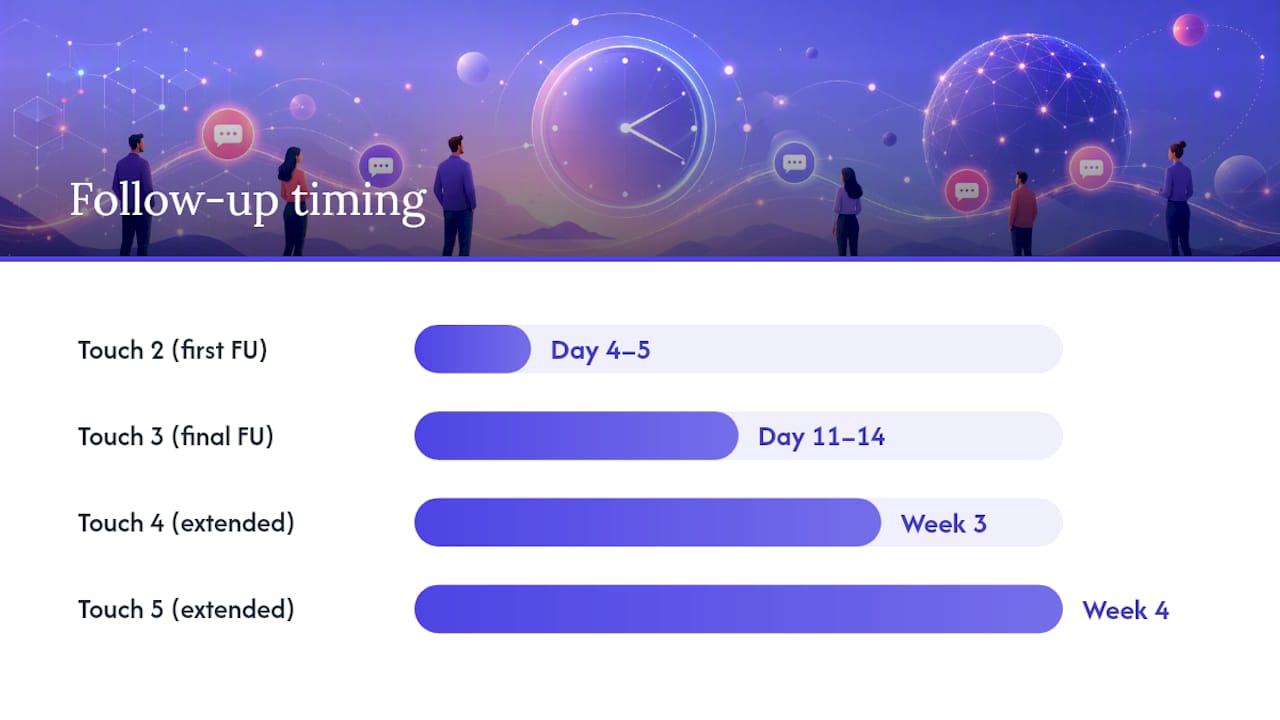
A three-touch cadence covers most scenarios: day 0 (initial message), day 4 to 5 (first follow-up), and day 11 to 14 (final follow-up). For higher-value targets, like a hiring manager at your top-choice company or a prospect at an account you're prioritizing, extend to five touches over three to four weeks, spacing the last two further apart.
- Touch one (day 0): the anchor, bridge, ask message, no pitch.
- Touch two (day 4-5): a new angle, not a repeat. Reference a different signal, share a short resource, or ask a slightly different question.
- Touch three (day 11-14): the highest-effort touch. This is where a voice note or a one-line personal observation tends to outperform a plain text nudge.
- Touch four (extended, week 3): a brief, genuinely useful resource with no ask attached.
- Touch five (extended, week 4): a final, low-pressure close: "I'll leave this here, but if timing changes, happy to reconnect."
Cap outreach after the final planned touch. Continuing past five touches without a reply rarely converts and starts to read as pestering rather than persistence, which is a bigger reputational risk than a missed reply.
Measure reply rate at each touch separately from your acceptance rate. A high acceptance rate with low replies usually means your first DM is the weak link, not your targeting. Track acceptance, first-reply, and conversion-to-next-step as three distinct numbers to find where the sequence actually breaks down.
Pro Tip: Run a simple A/B test on your day 0 message across 50 to 100 similar prospects: half get a question-based ask, half get a statement-based ask ("Curious how you're handling X" vs. "Would love to hear how you're handling X"). The difference in reply rate tells you more about your audience than any generic best-practice list.
Where to Find Personalization Signals in 90 Seconds or Less
Good personalization doesn't require a research rabbit hole. It requires knowing where to look and picking one signal that's genuinely current.
Prioritize signals in this order: a post from the last two weeks, a comment they left on someone else's post, a recent job change, hiring or funding news about their company, and mutual connections you both know well. Job changes and funding announcements are the easiest to spot fast because they show up directly on the profile or in LinkedIn's notification feed.
Run this 90-second check before messaging anyone:
- Scroll their recent activity tab for a post or comment from the past two to three weeks.
- Check the "About" and experience sections for a title or company change in the last one to three months.
- Glance at mutual connections, and if there's a strong one, mention them by name in the ask.
A copyable signal example: "Saw you shared thoughts on [specific topic] last week" beats "I saw your recent post" because it names the actual subject. Fake personalization, tokens like {{first_name}} stitched into a generic template, or vague lines like "I've been following your work," reads as automated because it is. If the message would still make sense sent to a thousand different people unchanged, the anchor isn't specific enough yet.
Should You Use Voice Notes or Video in Cold Outreach?
Voice notes and short personalized videos tend to outperform plain text, but only when they land after some existing signal, not as a cold open to a total stranger. Practitioner data on template libraries shows 2 to 3x lifts in some tests when voice or video replaces a plain text touch later in a sequence.
- Save voice or video for touch three, after two text messages have gone unanswered but the prospect has shown some signal, like a profile view or a partial engagement.
- Keep voice notes under 30 seconds and videos under 45 seconds; longer clips get abandoned before the point lands.
- Test in small batches of 50 to 100 prospects before rolling a voice or video approach into your full sequence.
- Move fast on trigger-based messages: a job change or funding announcement loses relevance within days, so send within 48 to 72 hours of spotting it.
A quick benchmark worth remembering: connection notes with a relevant reason attached reply at 8.2%, nearly 3 points higher than blank requests at 5.3%, which is roughly the same order of magnitude of lift some practitioners report from adding voice to a stalled sequence.
More Fill-in-the-Blank LinkedIn Message Templates by Scenario
Beyond the three starter templates, these scenario-based versions cover the situations that come up most once you're running outreach regularly.
-
Post-accept DM (after a connection request with no note): "Thanks for connecting, [Name]. I noticed [specific detail from profile/activity], figured it was worth reaching out. [One-sentence bridge]. [Single question]?" Best used within 24 hours of acceptance, while your name is still fresh in their notifications.
-
Signal-triggered (job change): "Congrats on the move to [new role] at [Company]. Curious what's top of the list in the first 90 days, especially around [specific area]?" Works as either a connection note or first DM; trim the congratulations line if using it as a note to stay under the character limit.
-
Signal-triggered (hiring/funding news): "Saw the news about [funding round/hiring push]. Teams scaling that fast usually hit friction around [specific pain point]. Is that on your radar yet, or still early days?" Best as a first DM rather than a connection note, since it needs the extra word count to land.
-
Mutual-connection template: "Hi [Name], [Mutual connection] mentioned you're working on [specific project]. I've been circling similar problems and would love to trade notes, do you have 10 minutes sometime this week?" Naming the mutual connection by name, not just "a mutual connection," meaningfully raises trust on the first touch.
-
Follow-up variant (any scenario, day 5): "Following up in case this got buried. [New angle or resource, one sentence]. Still curious about [restate the original ask in fewer words]." Keep this one under 50 words; it's a nudge, not a second pitch.
Use templates one through three primarily as first touches. Templates four and five work best after some engagement already exists, whether that's a mutual connection, an accepted request, or a prior unanswered message. Swap the bracketed sections every time. A template that keeps the same bridge sentence across fifty sends starts to look like a script, even with a different name at the top.
What Most People Get Wrong About Cold LinkedIn Outreach
Most advice on this topic treats volume as the lever that matters most. It isn't. The prospects who reply usually do so because one specific line in the message made them feel seen, not because they were the hundredth person contacted that week. I'd rather see someone send twenty sharp, anchor-first messages a day than two hundred generic ones, because the sharp twenty compound into a reputation for being worth replying to.
Three priorities to apply this week: pick one signal type (job changes are the easiest to spot consistently), write one template around it, and track reply rate separately from acceptance rate so you know exactly where the sequence breaks. If you're running this at scale across a sales or recruiting team, the personalization step is usually where quality erodes first, which is part of why tools built for creative and outreach production, including the kind of multi-account distribution and diagnostic frameworks Jamesyee builds around video and B2B outreach, exist to keep volume from flattening the personal touch. Wing Assistant's approach to creative fatigue applies the same underlying logic: fresh, specific input beats recycled templates, whether that input is a video hook or a cold message anchor.
Test this for one week. Send twenty messages using the anchor, bridge, ask structure, track replies against your usual approach, and see which number actually moves.
— James
Sources
- How to Write the Perfect LinkedIn Cold Message
- How to Write a LinkedIn Cold Message
- 12 LinkedIn Message Templates with 30%+ Response Rates – Outly