
Treat ecommerce video as an operational system, not a one-off project. Start with a hero product video on your highest-traffic product page, layer in UGC and 2 to 4 short ad variants, then measure the downstream conversion lift before scaling further. Most brands see a measurable bump within 2 to 4 weeks and a clearer return within 30 to 90 days if they stay disciplined about testing.
TL;DR:
- Producing a single hero video for high-traffic products can deliver measurable conversion lifts within 2 to 4 weeks if tested properly.
- Matching video formats to buyer intent and category is essential; hero clips, demo videos, and testimonials serve different decision points.
- Embedding videos on product pages above or beside the add-to-cart button enhances impact, but slow load times can negate their benefits.
- Rapid, repeatable content systems using UGC, AI, and scaled production help maintain fresh creative without constant new shoots, especially for growing brands.
- Adapting videos for each platform's style and measuring downstream revenue metrics rather than vanity views optimizes campaign performance.
Table of Contents
- Why an Ecommerce Video Strategy Actually Moves Revenue
- Which Video Types Actually Earn Their Place on Your Site
- Where to Put Video and How to Avoid Killing Your Own Conversion Rate
- Production Budgets and Realistic Time-to-Ship
- Adapting One Video Shoot Across Every Channel
- How to Measure Whether Your Video Strategy Is Actually Working
- Building a Video System That Doesn't Run Out of Fresh Content
- Managed Creative Production as a Scaling Option
- Where Ecommerce Video Strategies Actually Go Wrong
- Ready to Fix Creative Fatigue in Your Ad Account?
- Sources
- FAQ
Why an Ecommerce Video Strategy Actually Moves Revenue
Roughly 89 to 93% of marketers now use video in their marketing mix, and most of them credit it as a top driver of engagement and return on ad spend. That level of adoption isn't hype. It reflects a simple buying reality: shoppers can't touch, flip, or try on a product online, and video closes that gap faster than photos or copy ever could.
Product page video is where the money shows up first. Depending on category and execution quality, conversion lift on product pages ranges from single digits up to 30 to 80%, with Amazon reporting more modest but consistent 5 to 15% gains on listings that include video. The lift comes from reduced purchase anxiety. A shopper who watches a fabric move, hears a product's actual sound, or sees a size comparison next to a hand or a doorway has fewer unanswered questions when they hit "add to cart."
Some categories benefit more than others:
- Apparel and footwear: fit, drape, and motion are hard to convey in stills.
- Beauty and skincare: texture, application, and finish need motion to read as real.
- Home goods and furniture: scale and assembly complexity drive hesitation without video.
- Electronics and gadgets: demo videos answer "does it actually do that" questions before support tickets do.
- Mid-to-high price bands ($50 to $500): the higher the price, the more reassurance a shopper needs before checkout.
Low-cost commodity items see smaller lifts, mostly because the purchase decision doesn't carry much risk either way.
Which Video Types Actually Earn Their Place on Your Site
Not every product needs the same video treatment, and producing five formats for a $12 phone case is a waste of budget. Match the format to the buying friction.
Hero videos (30 to 60 seconds) belong on every priority product page. They act as the visual anchor, replacing or supplementing your main image and typically showing the product in use, from multiple angles, in real conditions.
Demo and use-case videos (60 to 90 seconds) earn their spot on higher-consideration items where the shopper needs to understand a process, not just an appearance. Think kitchen tools, tech gadgets, or anything with a learning curve.
UGC and testimonial compilations (60 to 120 seconds) do the trust-building work that brand-produced content can't. A stitched sequence of real customers reacting to a product carries a credibility that a polished studio shoot doesn't.
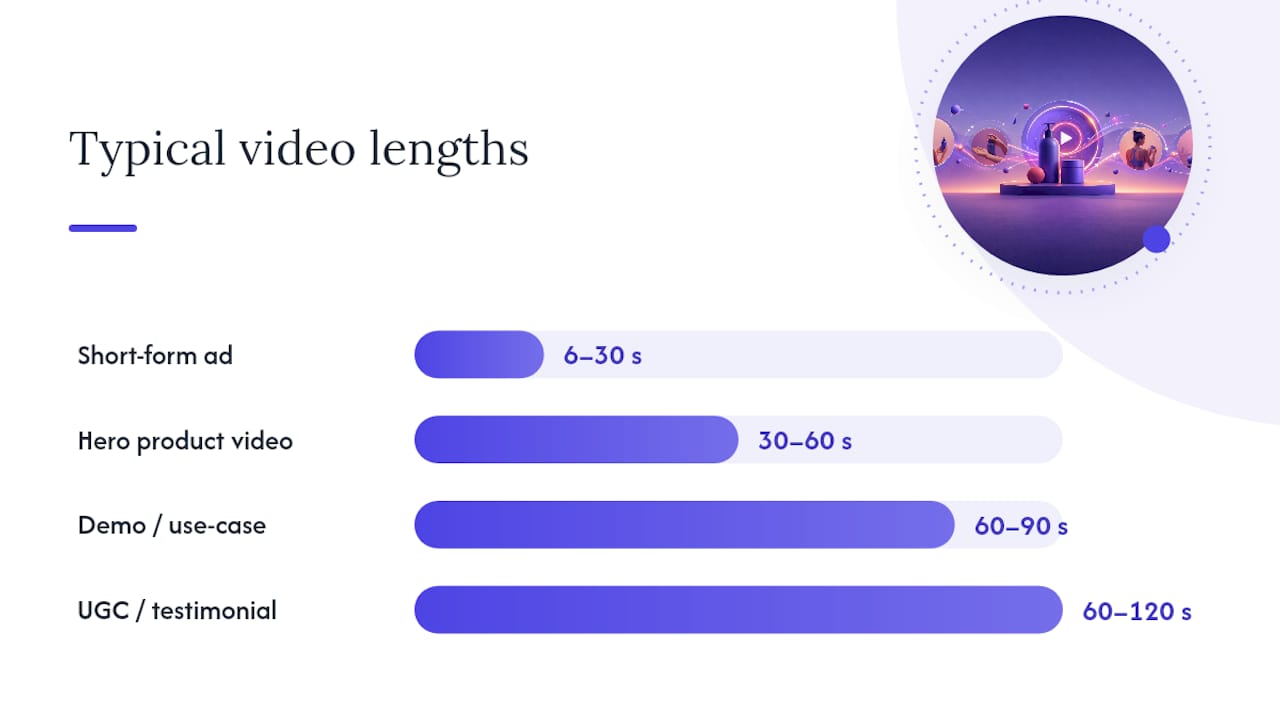
Short-form performance creative (6 to 30 seconds) is built for paid social, not the product page. These are the ad variants you'll rotate constantly to fight creative fatigue.
Shoppable and live formats work well layered on top of the others, particularly for brands running live shopping events or using in-app shopping features; shoppable video tends to increase average order value among viewers who engage with it directly.
| Video type | Length | Primary job | Where it lives |
|---|---|---|---|
| Hero product video | 30 to 60s | Anchor the PDP, reduce purchase anxiety | Product page |
| Demo/use-case | 60 to 90s | Educate on complex or high-consideration items | Product page, YouTube |
| UGC/testimonial | 60 to 120s | Build social proof and trust | Product page, email, social |
| Short-form ad creative | 6 to 30s | Drive paid social clicks and conversions | TikTok, Meta, Reels |
| Shoppable/live | Variable | Convert during active browsing or events | Shop app, live sessions |
A reasonable rule of thumb: budget 2 to 4 video types per product, scaling up with price and complexity. A $15 accessory might only need a hero clip. A $400 mattress topper probably needs all four.
Where to Put Video and How to Avoid Killing Your Own Conversion Rate
Placement decides whether your video helps or quietly drags down your page speed and your conversion rate. The highest-impact spots are your product detail pages (positioned above or beside the add-to-cart button, never buried below the fold), your homepage hero, key collection pages, and your FAQ or checkout flow for last-mile reassurance on shipping, returns, or sizing.
Technical execution is where most brands lose the benefit they just paid for. Slow load times and clunky embeds are among the most common reasons video fails to lift conversion, even when the creative itself is strong. A YouTube iframe embedded directly on a product page, for instance, often adds unnecessary load weight and pulls shoppers toward YouTube's own recommended videos instead of keeping them on your site.
Run through this checklist before publishing any product video:
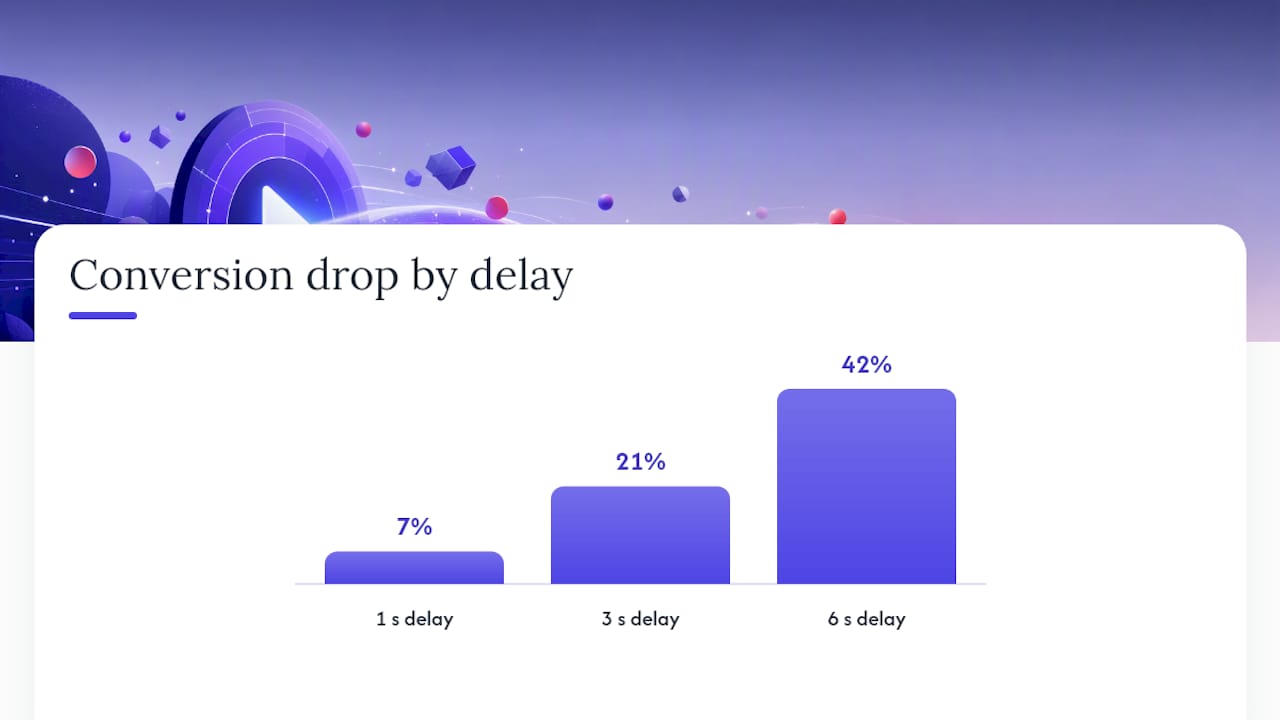
- First frame to play in under 3 seconds. Anything slower and a meaningful share of visitors will scroll past without pressing play.
- Use a self-hosted or commerce-first player, not a generic embed built for content platforms.
- Add burned-in or server-side captions. Most mobile shoppers browse with sound off, and captions also help with accessibility and search indexing.
- Default to mobile-first aspect ratios (9:16 or 4:5), since the majority of ecommerce traffic now arrives on phones.
- Mute and loop hero clips that autoplay. Sound-on autoplay is one of the fastest ways to make a shopper close the tab.
Page speed sensitivity isn't theoretical. Conversion rates can drop roughly 7% for every additional second of load time, which means a beautifully shot 4K hero video that takes six seconds to buffer can actively cost you sales rather than earn them.
Pro Tip: Design your first 10 seconds like a movie trailer, not a slow build. If the hook doesn't land in that window, most viewers bail before they see the product's best feature.
Thumbnail choice matters almost as much as the video itself. Use a frame that shows the product clearly in use, not a title card or a blank first frame, since that thumbnail often doubles as your static fallback image on slower connections. Strong product photography habits transfer directly here. Brands that already invest in sharp ecommerce product photography tend to produce stronger video thumbnails and hero frames, since the same lighting and composition principles carry over.
Production Budgets and Realistic Time-to-Ship
The right production approach depends on revenue stage, not personal preference. Trying to run enterprise-grade shoots when you're doing $500,000 a year in revenue is a fast way to burn cash before you've proven the channel works.
| Approach | Typical cost | Time to ship | Best fit |
|---|---|---|---|
| In-house smartphone | $50 to $200 per video | 1 to 3 days | Brands under $3M revenue, UGC-style content |
| Semi-pro freelance | $200 to $500 per video | 3 to 7 days | Growing brands needing polish without agency cost |
| Agency production | $1,500 to $5,000 per video | 1 to 3 weeks | Enterprise hero videos, brand campaigns |
| AI-generated | $50 to $200 per month subscription | Same day to 48 hours | Rapid ad variant testing, budget-constrained teams |
| Managed VA/hybrid | Flat monthly rate | 24 to 48 hours per batch | Teams scaling paid social creative volume |
For brands under $3 million in revenue, a smartphone plus a $100 lighting kit and free editing software covers most needs. One hero video and a handful of UGC clips will outperform a single expensive agency shoot that takes three weeks to arrive.
Brands in the $3 million to $10 million range usually benefit from a hybrid stack: one semi-pro or agency hero video per hero SKU, supplemented by an ongoing stream of lower-cost UGC and AI-assisted variants for testing.
Enterprise brands can justify agency budgets for flagship products but should still lean on faster, cheaper production for the constant churn of paid social creative. A production-cost stack that allocates roughly $3,000 across a hero video, a demo video, and a UGC batch tends to cover a complete product video foundation without overspending on any single asset.
Prioritization matters more than budget size. Ship the hero video first, then the demo, then UGC and performance variants. Skipping straight to paid ad creative before your product page has a video anchor is a common and costly sequencing mistake.
Adapting One Video Shoot Across Every Channel
Blind repurposing, dropping the same 60-second product page video straight into a TikTok ad, is one of the most common and most avoidable mistakes in ecommerce video marketing. Each platform rewards a different format, and short-form content dominates discovery while on-site video drives the actual purchase decision, which means the same footage often needs a completely different edit depending on where it lands.
- TikTok and Reels: keep it native and creator-style, with a 15 to 45 second hook that feels shot on a phone, not in a studio. Polished brand content underperforms here.
- Meta (Facebook and Instagram feed/story ads): run 6 to 30 second performance creatives and test 4 to 6 variants simultaneously, rotating out losers within days, not weeks.
- YouTube: lean into how-to and review formats. Longer-form content (2 to 8 minutes) performs well for discovery and search, especially for higher-consideration products.
- Email and SMS: use a static thumbnail with a play button overlay that links back to the on-site video rather than embedding a heavy file directly in the message.
- Marketplaces and shopping apps: check platform-specific specs for shoppable video, since aspect ratio and file size requirements often differ from your own site's player.
The through-line is simple: match the edit to the platform's native content style, not the other way around.
How to Measure Whether Your Video Strategy Is Actually Working
Views and completion rate feel good on a dashboard, but they don't pay the bills. Measurement should prioritize downstream revenue metrics like add-to-cart delta, conversion lift, and cost per acquisition movement, not vanity numbers.
Track these in order of business relevance:
- Play rate: what percentage of page visitors start the video.
- Completion rate: how many watch to the end, which signals hook and pacing quality.
- Add-to-cart delta: the difference in add-to-cart rate between viewers and non-viewers on the same page.
- Conversion lift: the actual purchase rate difference between the two cohorts.
- CPA movement: whether video-based ad creative lowers your cost per acquisition over a testing window.
The cleanest way to isolate impact is a cohort comparison: split traffic so some visitors see the video and some don't, then compare conversion between the two groups rather than trusting a before-and-after site-wide average, which gets muddied by seasonality and traffic mix.
On cadence, run weekly creative reviews to catch underperforming ad variants early, monthly placement experiments to test new spots (a collection page hero, a checkout reassurance clip), and a 90-day checkpoint to validate whether the whole video program is paying for itself against production and media spend.
Building a Video System That Doesn't Run Out of Fresh Content
The brands winning at this in 2026 aren't producing more video. They're producing the right volume through a repeatable process instead of scrambling for a new shoot every quarter.
Source content in layers. Start with UGC and social import, since it's the cheapest and often the most trusted format. Add AI-assisted baseline generation for quick variant testing. Reserve original hero productions for your highest-traffic SKUs where the investment pays back fastest.
A working 90-day system usually includes:
- Rights management: a simple release form for every piece of UGC before it touches a paid ad.
- Standard production specs: one document defining aspect ratio, caption style, and thumbnail rules so every contributor, freelance or in-house, delivers usable files.
- A rolling content calendar: brief-to-publish turnaround targets (48 hours for social variants, 1 to 2 weeks for hero shoots) so production doesn't stall the whole program.
- A quarterly audit: review which SKUs still lack any video coverage and prioritize those next.
AI tools now make it realistic to generate a dozen ad variants from a single raw clip in a single afternoon, which is valuable for creative testing but shouldn't replace human review entirely. Authenticity still reads to shoppers, and an unreviewed AI edit can introduce awkward pacing or a mismatched voice that undercuts trust.
Pro Tip: Keep one raw, unedited version of every hero shoot on file. When a new platform trend emerges six months later, you'll have the source footage ready instead of scheduling a reshoot.
Managed Creative Production as a Scaling Option
Building this system in-house takes time most marketing teams don't have, especially once you're running multiple ad variants across TikTok, Meta, and LinkedIn simultaneously. This is the gap A managed creative production service can take a single piece of raw video and turn it into multiple ad-ready variations, typically within 24 to 48 hours.
That turnaround matters because creative fatigue sets in fast on paid social, and waiting a week or two for a traditional agency to deliver a handful of new cuts often means running stale creative through your highest-spend period.
This model fits performance marketers and growing ecommerce brands that already have raw footage but lack the internal bandwidth to keep producing variations at the pace paid social demands. Teams still building their first hero videos should focus there first; managed VA workflows earn their value once you already have a volume problem, not before.
Where Ecommerce Video Strategies Actually Go Wrong
The three mistakes I see most often: skipping measurement entirely and just assuming video "helps," botching the technical execution so a good video actively slows the page down, and repurposing one asset across every platform without adapting it. Each one is fixable in a weekend, not a quarter.
If you're starting from zero, here's the five-step version: pick one high-traffic SKU, brief a single hero video, host it correctly with a fast, commerce-first player, add captions, then run a clean 30-day test against a non-video control page. Treat the result as your baseline, not your final answer. Systems beat single shoots every time.
— James
Ready to Fix Creative Fatigue in Your Ad Account?
If you already have raw footage sitting in a folder somewhere, the fastest path to more ad-ready video isn't another agency quote or another week waiting on a freelancer. Some managed creative production services can turn a raw clip into a full batch of fresh ad variations in 24 to 48 hours, often at lower cost than traditional agencies, helping paid social accounts maintain a steady flow of new content.
This is built for performance marketers and ecommerce brands who are past the "do we need video" question and squarely in the "how do we keep enough fresh creative in rotation" problem. If your CPA has been creeping up because your top ad has been running unchanged for three weeks, that's usually the signal to bring in managed creative velocity instead of another internal hire. Check out the ad fatigue solution and see how quickly a new batch of variants could be in your ad manager.
Sources
- Wyzowl — Video marketing statistics
- Why your product page needs a video in 2026 (conversion data) — EvolveAMZ
- Video marketing for ecommerce: the complete strategy guide — Videowise
- Product video best practices for ecommerce — Swarmify
FAQ
What Is the Best Video Marketing Strategy for Ecommerce?
Start with a hero video on your highest-traffic product page, add UGC and short paid social variants, then measure the conversion lift before scaling. Treat it as an ongoing system rather than a one-time shoot.
What Is the 3-3-3 Rule in Video Marketing?
Definitions vary across marketers, but a common version suggests hooking viewers in the first 3 seconds, delivering the core message within 3 sentences or beats, and prompting action within the first 30 seconds. Treat it as a pacing guideline, not a strict formula.
How Much Does Ecommerce Video Production Cost?
Costs range from $50 to $200 for smartphone-shot clips up to $1,500 to $5,000 for agency-produced hero videos, with AI-assisted subscriptions typically running $50 to $200 per month for rapid variant generation.
Do I Need Captions on Ecommerce Product Videos?
Yes. Most mobile shoppers browse with sound off, so burned-in or server-side captions are necessary for both engagement and accessibility compliance.