

Use a one-page creative brief template that states one objective, then fills in audience, message, deliverables, timeline, mandatories, and owner. Pick a campaign brief, ad creative brief, video brief, or client onboarding brief based on what you're producing, download the matching format, and write the objective line first. Everything else in the document exists to support that one line.
TL;DR:
- Only include a full brief for complex projects like rebrands or multi-channel campaigns, while simple ads require just a one-page core document.
- The core brief should always answer nine key questions: purpose, audience, insight, proposition, proof points, deliverables, tone, mandatories, and approval flow.
- Revise the brief only when major factors change, such as objectives, deliverables, timeline, or scope; subjective creative feedback should stay in review notes.
- Use templates that keep the core brief to one page, with detailed technical specs and legal language moved to appendices to ensure readability.
- Draft, review, and lock the brief efficiently by assigning clear owners, setting deadlines, and focusing reviews on only the most crucial elements.
Table of Contents
- What is a creative brief, and why does it matter?
- When do you actually need a full brief?
- What fields belong in every creative brief template?
- How do you draft, review, and lock a brief without dragging out the process?
- Which template should you use, and what does a filled example look like?
- What separates a brief that works from one that causes rework?
- Who should write and approve the brief?
- How do you get stakeholder input without turning the brief into a group document?
- When should you revise a locked brief mid-project?
- How do you adapt a template across industries and project types?
- Why we default to a one-page brief with appendices
- Want to move from finished brief to finished ads faster?
- Sources
What is a creative brief, and why does it matter?
A creative brief is the single document that tells a creative team what to make, for whom, and why it matters before a single asset gets designed or filmed. It's not a status update and it's not a mood board. It's a decision record: the objective, the audience, the message, and the constraints, written down so nobody has to guess halfway through production.
Teams that skip this step pay for it in revisions. The AMA's creative brief template frames the document around strategic context, audience insight, and production detail specifically because vague briefs are the most common cause of missed deadlines and wasted design hours. A tight brief front loads the thinking so the execution phase moves fast.
The benefits show up in three places:
- Alignment. Everyone, from the strategist to the video editor, works from the same objective instead of their own interpretation of it.
- Efficiency. Fewer rounds of "this isn't what we meant" feedback because the mandatories were stated up front.
- Brand consistency. Tone, voice, and visual mandatories get locked before production, not corrected after.
A brief doesn't guarantee good creative. It guarantees everyone is solving the same problem.
When do you actually need a full brief?
Not every project needs the same document. A single static ad running for two weeks doesn't need the same paperwork as a rebrand touching six channels. Match the brief's depth to the project's risk and complexity:
- Single ad or one-off asset. Half a page. Objective, audience, one key message, and specs. Skip the appendices.
- Multi-asset campaign. Full one-page core brief, plus a short appendix listing deliverables by channel and format.
- Video production. One-page core brief plus a technical appendix: aspect ratios, shot references, running time, and the specific behavior change the video needs to cause. Rob Pinney Studio's video brief guidance is built around this exact split because producers need concrete specs, not a vague creative direction.
- Rebrand or multi-quarter initiative. Two to three pages, since legal claims, brand guideline references, and multi-team sign-offs need their own space.
The rule of thumb: keep the core brief to one page regardless of project size, and push anything format-specific (specs, legal language, shot lists) into an attached appendix. That keeps the strategic document readable while the production team still gets the detail they need. One-page cores also cut down on ambiguity because reviewers actually read the whole thing, which research on ad creative briefs points to as a real driver of fewer revision cycles.
Timeline planning follows the same logic: a half-page ad brief might take fifteen minutes to approve, while a video brief with a technical appendix needs a same-day review from both creative and production before anyone books a shoot day.
What fields belong in every creative brief template?
Most creative brief templates converge on the same skeleton, because the same nine questions have to get answered no matter what you're producing. Asana's guidance on creative briefs lands on this same nine-part structure: purpose, audience, insight, desired response, proposition, mandatories, deliverables, tone, and approval flow.
Here's the field list, with what to actually write in each one:
- Project title. Short and searchable. "Q1 retargeting campaign," not "New Project."
- Background. Two sentences on context. Why this project now?
- Single objective (with a metric). One sentence. "Increase click-through rate on retargeting ads from 1.2% to 1.8% by March 31." Not three goals stacked together.
- Audience persona. Name the person, not the demographic. "Sarah, 34, abandoned her cart twice this month because shipping cost surprised her at checkout."
- Key insight. The tension driving the work. Because [audience behavior] X, therefore we will [creative approach] Y.
- Single-minded proposition. One sentence describing the core idea, no committee-written run-ons.
- Proof points. The two or three facts that back up the proposition.
- Deliverables and specs. Exact formats, dimensions, channel destinations.
- Tone and mandatories. Voice guidance plus anything legally or brand-required that must appear.
- Timeline and milestones. Draft date, review date, delivery date.
- Budget range. Even a rough band prevents scope surprises later.
- Owner and approvals. Who signs off, and in what order.
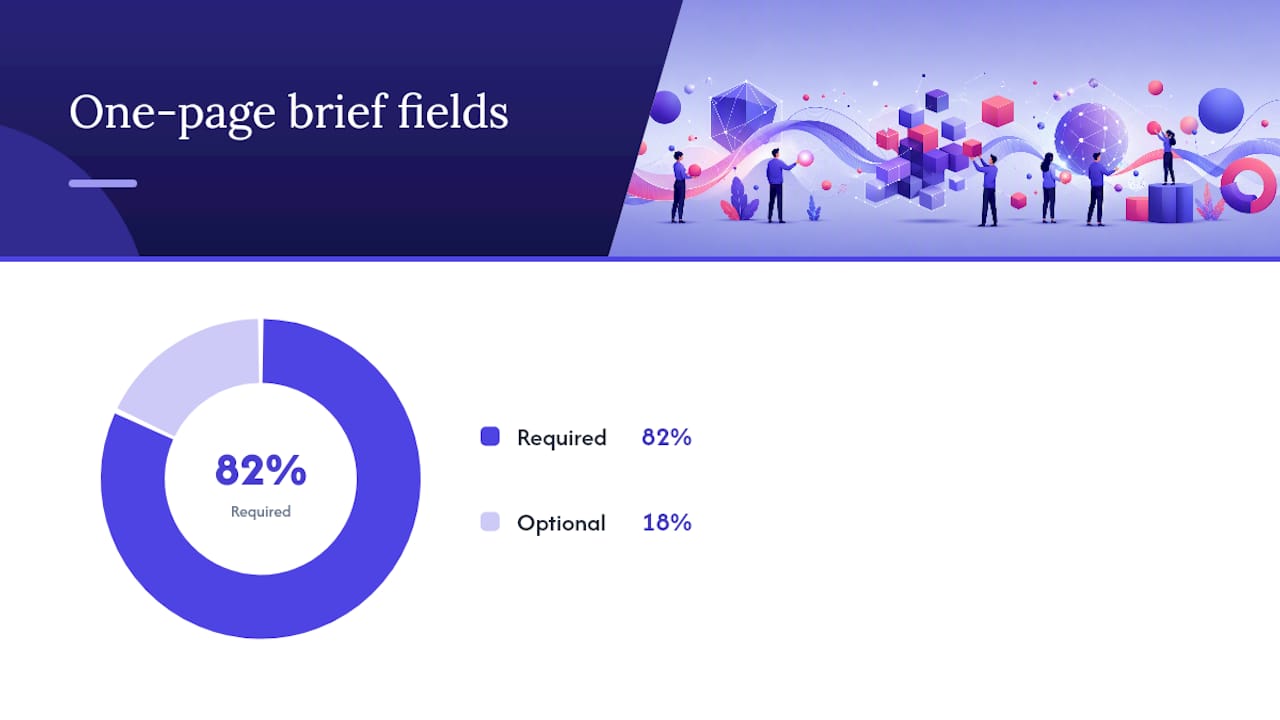
For a one-page brief, the first nine fields are required. Budget detail and extended mandatories can move to an appendix if space runs tight.
Pro Tip: Write the objective and audience persona fields before anything else. If you can't write one clear sentence for either, the brief isn't ready to go to production, no matter how polished the rest of the document looks.
How do you draft, review, and lock a brief without dragging out the process?
The workflow is the same whether you're producing one ad or a twelve-asset campaign; only the time estimates change.
- Draft. The account or strategy lead writes the first version using the client's input or campaign goals. Budget 45 to 60 minutes if you're working from a complete client brief, and closer to 2 to 3 hours if you're starting from raw discovery notes and need to synthesize the objective yourself.
- Internal review. The creative lead reads it for one thing: can a designer or editor start working from this without asking a clarifying question? If not, it's not done.
- Client review. Send it back to the client or internal stakeholder for sign-off on the objective, audience, and mandatories specifically, not a line-by-line copyedit.
- Lock and distribute. Once approved, the brief becomes the production reference. No more edits without a version note.
Before releasing any brief, run this checklist:
- Does it state exactly one objective with a metric attached?
- Are all mandatories (legal, brand, client-required) listed explicitly?
- Are deliverables specified by format and channel, not just described generally?
- Is there a named owner responsible for the document?
- Does the approval flow show who signs off, and in what order?
Pro Tip: If your internal review keeps surfacing the same missing field project after project, that's a template problem, not a discipline problem. Fix the template once instead of re-litigating it every cycle.
Which template should you use, and what does a filled example look like?
Four template types cover almost everything a marketing or creative team produces:
- Campaign brief. For multi-asset, multi-channel work with a shared strategic thread.
- Ad creative one-pager. For a single ad or a small set of variations testing one concept.
- Video production brief. For anything involving a shoot, edit, or motion deliverable.
- Client onboarding brief. For the first project with a new client, where background and brand context need more space.
A video brief example: Objective, "Cause viewers to associate the product with a five-minute morning routine, not a supplement aisle." Specs, "9:16 vertical, 30 seconds, captions burned in, two example shots referenced from prior campaign." That level of specificity is exactly what StudioBinder's video creative brief guidance recommends, since production teams work faster when references are concrete rather than described in adjectives.
For format, plain documents (Google Docs, Word, PDF) work fine for a straightforward brief. Teams that need real-time co-editing or visual reference boards often move to Canva's collaborative brief templates, Miro, or Milanote, and HubSpot offers downloadable versions in several editable formats if you want a ready-made starting point.
| Template type | Best for | Typical length |
|---|---|---|
| Campaign brief | Multi-asset, multi-channel projects | One page plus channel appendix |
| Ad creative one-pager | Single ad or small variation set | Half page |
| Video production brief | Any shoot or edit deliverable | One page plus technical appendix |
| Client onboarding brief | First project with a new client | One to two pages |
What separates a brief that works from one that causes rework?
The briefs that hold up under production pressure share the same handful of habits. The ones that generate revision cycles share the same handful of mistakes.
Best practices worth building into your process:
- State one objective, not three goals dressed up as one.
- Write the audience as a specific person, not a demographic slice.
- Keep the proposition to a single sentence.
- List mandatories explicitly, don't assume the team already knows them.
- Name one owner accountable for the document, since a brief nobody owns is a brief nobody maintains, a point Rock.so's creative brief guidance makes directly.
Common mistakes and their fixes:
- Multiple objectives crammed into one line. Fix: pick the primary metric and move the rest to secondary notes.
- Vague audience descriptions ("millennials who like fitness"). Fix: name a persona with a specific behavior.
- Missing technical specs on video or multi-format work. Fix: attach a format appendix before distribution.
- No named approver. Fix: add one line stating who signs off and by when.
Pro Tip: Before you send any brief, read it as if you're the designer who's never spoken to the client. If a question comes to mind, the brief isn't finished.
Who should write and approve the brief?
The account or strategy lead usually drafts it, since they hold the client relationship and campaign context. The creative lead reviews it for production feasibility. The client, or an internal stakeholder acting in that role, gives final sign-off on objective and mandatories.
Keep the approval chain to two steps wherever possible: internal review, then client approval. Longer chains slow everything down without improving quality.
- Update the brief with a version note whenever the objective or mandatories change.
- Never let a verbal change replace a written update. Verbal changes are how mandatories get missed.
How do you get stakeholder input without turning the brief into a group document?
The brief needs input from multiple people, strategy, creative, the client, sometimes legal, but it should never be drafted by committee. Collect input first, then let one person write.
Run a short kickoff conversation or async questionnaire with the client or internal stakeholder before drafting anything. Ask directly for the objective, the audience pain point, and any mandatories that aren't negotiable. This is faster than an open-ended brainstorm because it gives you specific, quotable material instead of general impressions you have to interpret later.
Once the draft exists, share it for feedback with a deadline and a specific ask: "Confirm the objective and mandatories are accurate, don't rewrite the tone section." Open-ended review requests invite line edits on sections that don't need debate. A narrow ask keeps feedback focused on the parts that actually change the production outcome.
If legal, brand, or a second stakeholder group needs to weigh in on tone or visual direction, get that input before the creative team starts working, not after a draft already exists. Referencing outside creative direction resources, like guidance on establishing visual tone for brand campaigns, can help stakeholders articulate what they actually want instead of reacting to finished work.
Disagreements about the objective or proposition should get resolved before the brief is locked, not during production. A brief that changes mid-flight because two stakeholders never aligned on the strategy costs far more time than an extra thirty minutes of alignment upfront.
When should you revise a locked brief mid-project?
A brief isn't a static document. It's a working reference that should get updated when the facts on the ground change, but not every small request warrants a rewrite.
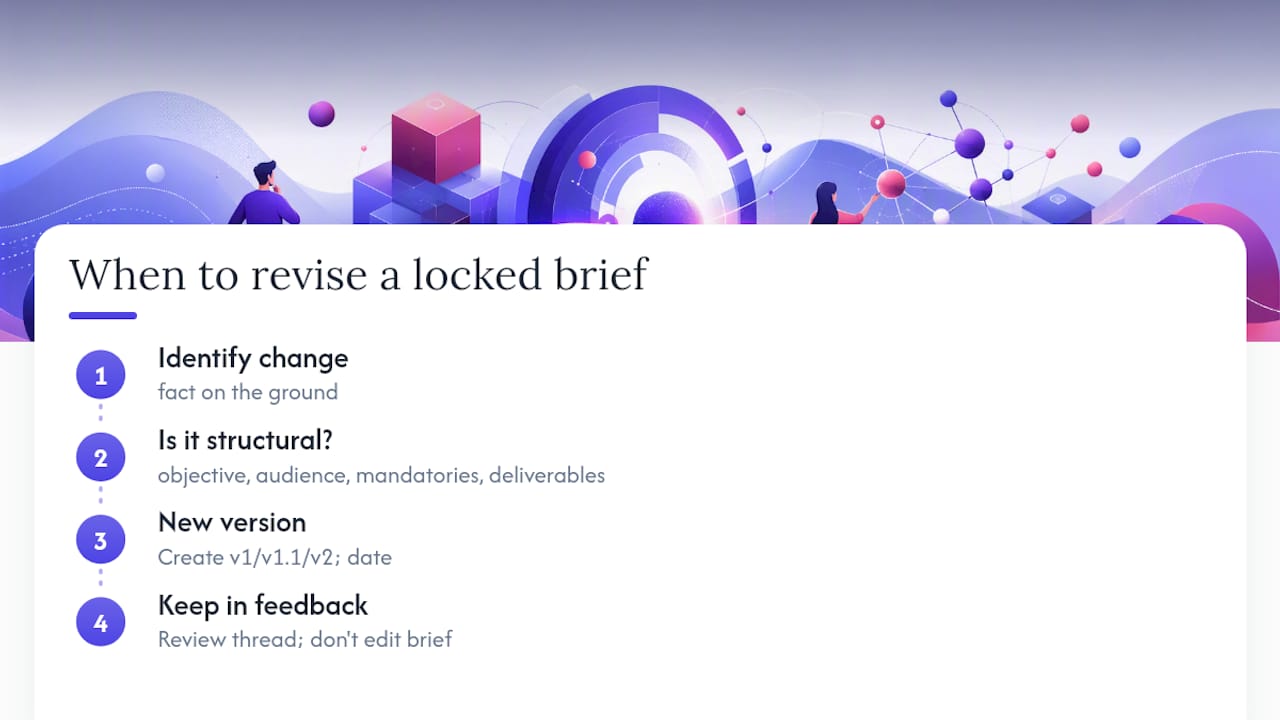
Update the brief when the objective shifts, a new mandatory gets added (a legal requirement, a new brand guideline), the timeline moves in a way that affects deliverables, or the budget changes enough to change scope. These are structural changes. They belong in a new version of the document, with a version note and date, so the production team knows exactly what changed and when.
Don't update the brief for every piece of subjective creative feedback. If a stakeholder wants a different headline tone on round two of an ad, that's creative direction feedback, not a brief revision. Keep that conversation in the review thread, not in the strategic document.
A practical rule: if the change affects the objective, audience, mandatories, or deliverables, it goes in the brief. If it's a preference about execution, it goes in feedback notes. Version the document (v1, v2, v1.1) so anyone opening it later knows which iteration they're looking at, and archive old versions rather than deleting them. Campaigns that run for months often need to reference what the original objective was, especially when performance data suggests a pivot.
How do you adapt a template across industries and project types?
The nine core fields stay the same across almost every industry. What changes is what goes inside them.
For e-commerce and performance marketing, the objective field should almost always tie to a hard number: CPA, click-through rate, conversion rate. The audience persona benefits from real behavioral detail like cart abandonment patterns or browsing time, since that's what actually drives creative decisions for paid social and video ads.
For B2B and professional services, the audience persona shifts from a consumer behavior sketch to a role-based description: title, pain point, what they're accountable for internally. Mandatories in B2B briefs more often include compliance language or approved terminology that legal or product teams require.
For consumer packaged goods and retail, the tone and mandatories field usually carries the most weight, since brand guidelines, packaging rules, and regulatory claims (health, sustainability) tend to be stricter than in other categories.
For agencies working across multiple client industries, the fix isn't building a different template for every vertical. It's keeping the same one-page structure and treating the audience persona and mandatories fields as the ones that get industry-specific attention every time, while objective, deliverables, and timeline stay structurally identical. That consistency is what makes a template reusable instead of something you rebuild from scratch every project.
Why we default to a one-page brief with appendices
Most creative brief failures come from over-complicated documents, not under-detailed ones. A ten-page brief gets skimmed, not read, and the objective buried on page seven never actually reaches the designer's attention. A one-page core brief, with appendices for format-specific technical needs or legal claims, gets read in full because it's short enough to demand attention.
Appendices earn their place when the project genuinely needs them: video specs, usage rights, legal disclaimers. They don't earn their place as a dumping ground for context nobody asked for. Treat the first draft as a starting point, not a final answer. The best briefs get sharper after the first round of production feedback, not before it.
— James
Want to move from finished brief to finished ads faster?
Once your brief is locked, someone still has to turn one raw video asset into the multiple ad variations your objective and deliverables actually call for, and that's where most in-house teams lose the time they just saved writing a tight brief. This execution step can be run as a managed service where a creative team takes your completed brief and raw footage and produces fresh ad variations for testing, typically within a couple of days, instead of the longer timelines traditional agency workflows usually require.
This approach is used to combat creative fatigue, the point where an ad stops converting because audiences have seen it too many times. If your brief is complete and you'd rather outsource execution than increase in-house staffing, check what a managed ad creative workflow looks like and decide whether DIY production or managed execution fits your next campaign.
Sources
- AMA Creative Brief Template - American Marketing Association
- Free Video Production Brief Template — Rob Pinney Studio
- Creative briefs: What to include (Asana)