

Start with a 5-worksheet spreadsheet system built around a Home dashboard, an Annual view, a Monthly view, a Daily task tracker, and a canonical Events database. An ad creative calendar organizes every asset, deadline, and owner across paid campaigns into one shared file, so nobody launches a stale creative or misses a testing window. Enterprise teams with high volume or approval bottlenecks eventually outgrow the spreadsheet, but for most teams, this five-sheet layout is the fastest way to cut creative friction and make ownership obvious.
TL;DR:
- A five-sheet ad creative calendar is ideal for small to mid-size teams, covering status overview, long-range planning, execution, daily tasks, and a centralized data source.
- The Events database must include key fields like campaign, concept, platform, dates, owner, creative and approval status, asset link, and KPI targets, using clear naming conventions.
- Weekly updates are essential to keep the calendar current, with a dedicated owner reconciling planned activities against actual shipments and testing outcomes.
- As campaign volume increases, teams should transition from spreadsheets to workflow tools or integrated platforms, especially when approval complexity and production bottlenecks grow.
- Using dedicated creative production services can significantly reduce costs and accelerate testing, especially when staffing constraints limit internal output capacity.
Table of Contents
- Why an Ad Creative Calendar Beats a Standard Content Calendar
- What Are the Five Parts of an Ad Calendar System?
- Should You Use a Spreadsheet, a Project Tool, or an Integrated Platform?
- What Fields Should Every Calendar Entry Include?
- How Do You Keep the Calendar From Going Stale?
- How Does a Calendar Actually Reduce Creative Fatigue?
- When Does a Calendar Stop Being Enough?
- A Faster Route When the Bottleneck Is Production, Not Planning
- Templates and Reads Worth Bookmarking
- Sources
- FAQ
Why an Ad Creative Calendar Beats a Standard Content Calendar
A content calendar tracks what gets published and when. An ad creative calendar tracks something messier: creative life cycles, testing windows, approval states, and which variant is burning through budget at what CPM. Paid media moves faster than organic content, and it punishes disorganization harder. A missed content post costs you a day of reach. A missed creative refresh during a fatigue spike can quietly inflate your cost per acquisition for weeks before anyone notices.
The calendar's real job is coordination between three groups that rarely talk enough: media buyers who need fresh assets to feed algorithms, creative teams producing the assets, and whoever approves them before they go live. Without a shared file, that coordination happens through scattered Slack messages and forgotten email threads.
A working ad creative calendar should:
- Serve as the single source of truth for what's live, what's testing, and what's retired
- Track creative status (in production, in review, approved, live, paused) at a glance
- Flag testing windows and freeze dates before they arrive, not after
- Give media buyers and creative producers the same view of upcoming deadlines
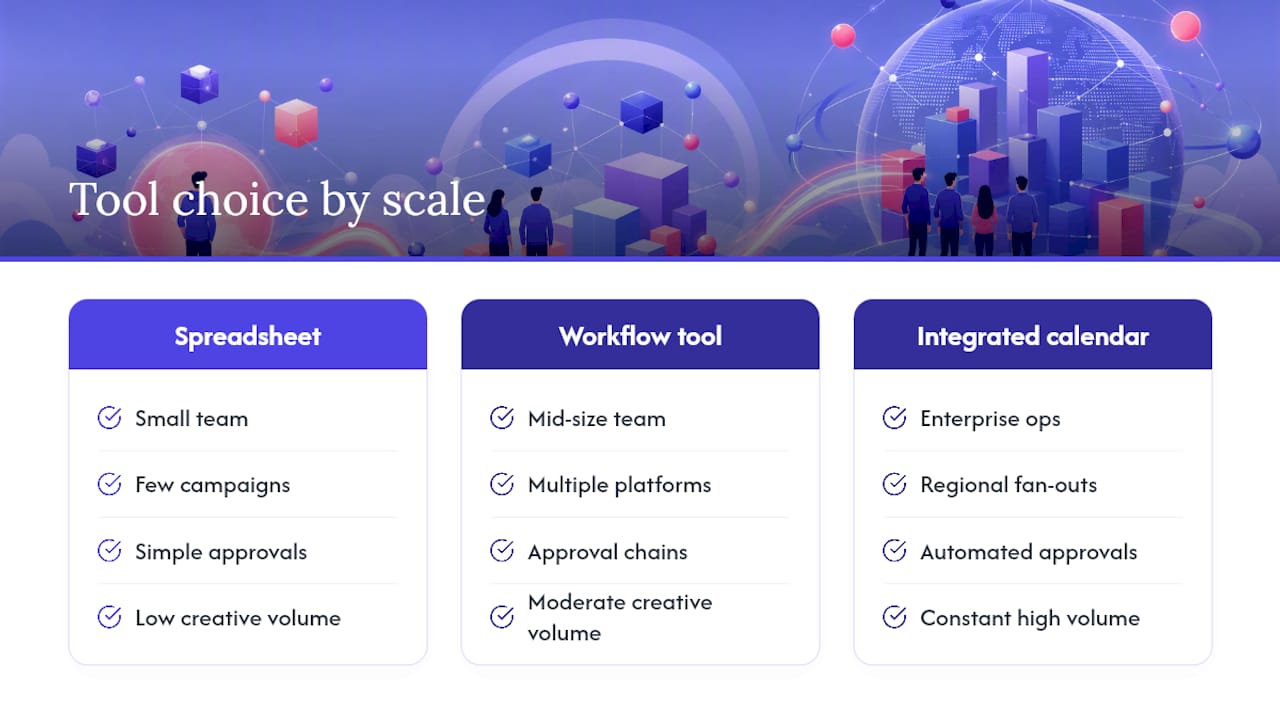
Choosing the right format comes down to scale. A 5-worksheet ad calendar works fine for teams running a handful of active campaigns. Once you're juggling dozens of concurrent creative tests across multiple platforms, a workflow tool or an integrated publishing calendar earns its complexity.
What Are the Five Parts of an Ad Calendar System?
Most advertising-specific templates converge on the same five-sheet architecture, and for good reason: each sheet does one job well instead of trying to be everything at once.
- Home dashboard. A snapshot view showing active campaigns, upcoming deadlines, and creative status counts. This is where a manager checks in for thirty seconds and knows if anything is on fire.
- Annual view. The long-range map of campaign seasons, product launches, and major promotional windows, so nobody plans a creative sprint during a week already committed to a product launch.
- Monthly view. A filtered slice of the Annual view showing what's shipping this month, broken down by platform and campaign.
- Daily view. A date-filtered task list pulling from the Events database, used for launch-day checks and daily standups.
- Events database. The canonical table holding every creative asset, its metadata, and its status. Every other sheet is really just a filtered view of this one table.
NextGenTemplates' digital advertising calendar built for Google Sheets follows exactly this pattern, and it illustrates why the Events database matters so much: change a status or date in that one table, and the Monthly and Daily views update automatically because they're just filtered pulls.
| Sheet | Primary job | Who uses it most |
|---|---|---|
| Home | Status overview | Managers, stakeholders |
| Annual | Long-range planning | Media strategists |
| Monthly | Execution planning | Creative and media teams |
| Daily | Task tracking | Producers, coordinators |
| Events | Canonical data source | Everyone, indirectly |
A monthly launch review pulls from Monthly. A pre-launch sanity check pulls from Daily. A Monday standup where someone asks "what's live right now" pulls from Home. The Events table feeds all three.
Should You Use a Spreadsheet, a Project Tool, or an Integrated Platform?
The honest answer is that it depends on how many campaigns you're running and how many people need to touch the calendar without breaking it.
Google Sheets or Excel templates are the right starting point for most teams. They're free or nearly free, easy to share across departments, and flexible enough to bend around whatever weird workflow your team already has. The AMA Content Marketing editorial calendar toolkit is a good reference point here: it packages yearly, monthly, and weekly views with a content repository and standard fields for platform, owner, and status, which is close to what an ad-specific version needs.
Project tools like Asana, Notion, or Monday make sense once approvals and dependencies get complicated. If a creative asset needs to pass through copywriter, designer, and legal before it can go live, a spreadsheet gets clunky fast. A project tool tracks who owns each stage and nudges people when something is stuck.
Integrated publishing platforms belong in the conversation once you're managing regional fan-outs, multi-language variants, or automated approval chains. Enterprise tools in this category tend to layer in AI-suggested publish windows and live performance data directly into the calendar entry, turning the calendar into the actual system of record instead of a planning document.
Whatever format you choose, a good downloadable template should include:
- Pre-built tabs matching the five-part structure above
- Conditional formatting that flags overdue or unapproved items in red
- Dropdown fields for status and platform to prevent free-text chaos
- A locked Events table with protected formulas feeding the filtered views
What Fields Should Every Calendar Entry Include?
An ad creative calendar entry is only useful if it answers questions before someone has to ask them. Vague rows like "new video, TBD" create more confusion than an empty calendar would.
Every row in your Events table needs, at minimum:
- Campaign it belongs to
- Concept name and variant ID (so "Hook A" and "Hook A, cut 2" don't get confused)
- Platform (TikTok, Meta, LinkedIn, display, search)
- Start and end dates, with timezone noted if you run global campaigns
- Owner responsible for the asset
- Creative status (drafting, in review, approved, live, paused, retired)
- Asset link pointing to the actual file, not a folder
- KPI target tied to the test
- Approval state, separate from creative status, because "creative done" and "cleared to launch" are not the same thing
Naming conventions matter more than most teams realize. A workable pattern looks like: Campaign_Concept_Variant_Platform_Date. That single string tells a producer everything without opening the file. Tag each entry by concept cluster and emotional territory too, not just platform. System1 Group's creative strategy framework argues that aligning creative to a specific emotional appeal and business objective, rather than scheduling by gut feel, is what makes testing interpretable later.
Recording variant lineage matters just as much. When Variant C outperforms Variants A and B, you want the calendar to show it descended from the same concept cluster, so the next round is an iteration on a proven idea rather than a random new swing.
Pro Tip: Link the actual working file, not a shared drive folder, in the asset link field. A producer who has to hunt through twelve subfolders to find "the approved cut" will eventually just use the wrong one.
How Do You Keep the Calendar From Going Stale?
Assign a single owner. Not a team, not "whoever has time," an actual named person accountable for the calendar staying current. Treating the calendar as a live document with a scheduled weekly update is the difference between a tool people trust and one everybody quietly ignores because half the dates are wrong.
Here's a workable operating rhythm:
- Weekly update and debrief. Every week, the calendar owner reconciles the Events table against what actually shipped, and the team reviews what tested well.
- Test phase (cheap CPMs). Run new concept tests during lower-cost windows, well before demand spikes drive auction prices up.
- Build phase. Produce seasonal or holiday-specific versions of concepts that already proved themselves in testing.
- Pre-heat phase. Start warming up the winning creative with modest spend before the peak window opens.
- Harvest phase. Freeze new concept testing entirely during peak season. Spend on what's already validated.
- Reset. After the peak window closes, retire underperforming variants and start the next test cycle.
The Q4 timeline is the clearest example of why this cadence matters. Practitioner planning calendars generally recommend starting Q4 creative testing in August, five months out, so concepts get validated at normal CPMs instead of during the expensive scramble of November and December. Build holiday-specific versions in September and October, pre-heat in early November, then freeze new concept testing once peak season actually arrives. Testing a brand-new hook on Black Friday week, when CPMs are already inflated, is how teams burn budget learning lessons they could have learned in August for a fraction of the cost.
Use the Daily view for pre-launch checks (is the asset approved, is the link live, does the date match the ad platform's actual schedule) and the Monthly view for the standup where the team looks at what's shipping in the next four weeks.
How Does a Calendar Actually Reduce Creative Fatigue?
Picture a mid-size e-commerce brand running TikTok and Meta ads. A media buyer notices CPA creeping up on a top ad. Instead of a scramble, they check the Events table, find that ad's concept cluster, and see three untested variant scripts already sitting in "drafting" status from the last brainstorm. One gets assigned a producer, moves to "in review," clears approval, and launches within 48 hours because the workflow was already mapped.
That's the difference a calendar makes: fatigue becomes a scheduled response instead of a fire drill.
Teams that tag creative by concept cluster and treat winning ideas as iteration targets, rather than one-off wins, tend to extend how long a creative stays profitable before it fatigues.
Track these fields on your dashboard to measure whether the system is working: [brand_signal], [internal_data], creative throughput (variants shipped per week), and CPA trend by concept cluster. A calendar that's actually doing its job should show rising throughput and a flattening CPA curve over a few testing cycles. and round out the picture, helping teams evaluate whether to build this in house or hand off execution.
When Does a Calendar Stop Being Enough?
A spreadsheet with discipline handles a small team running a few campaigns just fine. Mid-size teams juggling multiple platforms and approval chains usually graduate to a workflow tool like Asana or Notion. Enterprise operations with regional fan-outs and constant creative volume need an integrated calendar with automated approvals.
The warning signs are consistent: campaigns collide because two people built competing creative for the same slot, updates lag by days, or the calendar has more empty rows than filled ones. When that happens repeatedly, the fix isn't a fancier spreadsheet. It's better tooling for AI-assisted production or a workflow platform, whichever matches where the bottleneck actually sits: planning or production.
Invest in structure proportional to your creative volume, not your ambitions for it.
A Faster Route When the Bottleneck Is Production, Not Planning
A well-run calendar solves coordination. It doesn't solve the problem of not having enough hands to fill it. If your Events table is full of "needed" rows that never move to "in production" because your team is stretched thin, the calendar isn't broken, your output capacity is.
There are services that provide dedicated virtual assistants who take a single raw video and turn it into multiple ad variations quickly, instead of waiting days on an agency for a handful of cuts. Teams using this model to keep pace with a heavy testing cadence report a 31% drop in cost per acquisition, largely because fresh creative keeps landing on schedule instead of going stale between refresh cycles. That matters most during the exact test-and-harvest cycle described above, when your calendar demands new variants faster than an in-house team or traditional agency can turn them around.
If your calendar is well built but chronically understaffed on the production side, see how the ad fatigue framework works and check whether a managed creative pipeline fits your testing volume.
Templates and Reads Worth Bookmarking
For a ready-made structure, download the AMA content calendar toolkit for the multi-view planner pattern, or the NextGenTemplates advertising calendar for the five-sheet system built specifically for ads. For copy quality before anything ships, run entries through a content calendar proofreading checklist.
Sources
- Digital marketing calendar (Pipedrive)
- AMA Content Marketing editorial calendar toolkit
- Creative Strategy In Advertising | System1 Group
FAQ
What Is an Ad Creative Calendar?
It's a shared planning system, usually a spreadsheet or workflow tool, that tracks every ad creative's status, owner, platform, dates, and testing metadata in one place so media and creative teams stay aligned.
How Many Sheets Should an Ad Calendar Have?
Five: a Home dashboard, an Annual view, a Monthly view, a Daily task view, and a canonical Events database that feeds the other four.
When Should Q4 Creative Testing Start?
Around August, roughly five months before peak season, so concepts get validated at normal CPMs before demand and prices spike in November and December.
What Fields Does Every Calendar Entry Need?
Campaign, concept and variant name, platform, start and end dates, owner, creative status, approval state, asset link, and a KPI target.
How Often Should the Calendar Be Updated?
Weekly, at minimum, with one named owner responsible for reconciling planned entries against what actually shipped.
Is a Spreadsheet Enough, or Do I Need Software?
A spreadsheet works well for small teams with a handful of active campaigns; once approvals get complex or volume climbs, a workflow tool or integrated platform, or a managed service like Jamesyee for production itself, tends to fit better.